12 Affordable Social Media Video Makers in 2026

Creating high-quality videos for social media has become a necessity in 2026, but for many brands and creators, cost remains a major barrier. Social media video makers are in high demand as businesses struggle with rising creator fees, long production cycles, and the constant need for fresh content across multiple platforms. Posting consistently without burning budgets or time is a real challenge, especially when trends change every week. This is where modern video-making tools step in as the solution. Today’s AI-powered platforms help marketers, startups, and creators produce engaging social media videos faster, at a fraction of traditional costs, without compromising on quality or creativity.
What is a Social Media Video Maker/Generator?
A social media video maker or generator is a tool that helps you create platform-ready videos without complex editing skills. Social media video makers use templates, AI automation, and smart editing features to simplify video creation for brands and creators. Instead of shooting, editing, and rendering manually, users can generate videos in minutes for platforms like Instagram, TikTok, YouTube, etc.
To stay ahead in the fast-moving market, speed matters more than perfection. Video dominates feeds, ads, and discovery algorithms across platforms. According to Wyzowl, over 89% of businesses use video as a marketing tool, and nearly 90% say video delivers positive ROI. On Instagram, Reels consistently generate higher reach and engagement than static posts, making short-form video unavoidable.
This urgency has made AI-driven video generators essential. They reduce costs, save time, and help teams publish consistently. From AI UGC videos to branded reels and ads, these tools fit modern content demands.

12 Best Social Media Video Generators
| Tool Name | Best For | Key Features | Price (Per Month) |
|---|---|---|---|
| Canva | Beginner-friendly video design | Drag-and-drop editor, templates, stock media, AI design tools | $120 |
| FlexClip | Quick marketing videos | Templates, AI video generator, text-to-video, stock library | $30 |
| Tagshop AI | End-to-end AI video ads | URL → script → avatar → video, multi-platform ads, automation workflow | $23 |
| Steve.AI | Animated explainer videos | Text-to-animation, AI voiceovers, script-based video generation | $29 |
| Pictory | Long-form content to video | Blog-to-video, AI summarization, captions, stock visuals | $25 |
| PlayPlay | Professional marketing videos | Brand templates, team collaboration, social media video tools | Custom Pricing |
| Promo | Social media video ads | Video templates, marketing tools, licensed stock footage | $59 |
| Imagine | AI video creation | AI-powered editing, automatic scenes, text-based video tools | $30 |
| Renderforest | Branding & animated videos | Logo animations, video templates, branding toolkit | $29 |
| ClipFly | AI video editing | AI avatars, automated editing, templates for social media | $49 |
| WeVideo | Cloud-based video editing | Online editor, screen recording, collaboration tools | $28 |
| Vidio | Advanced video production | Video hosting, editing tools, marketing integrations | $50 |
Here is the list of the best social media video generator tools.
1. Canva
Canva is a widely used design platform that also supports social media video creation. It allows users to create videos using ready-made templates, drag-and-drop elements, and basic animations. Many teams rely on it as a social media video-making tool for quick visual content without advanced editing knowledge.
The platform is suitable for creating simple videos for posts, stories, and ads. Users can customize layouts, add text overlays, transitions, and background music. Canva also functions as a lightweight social media video generator for marketers who prioritize design consistency across formats.

Key Features
- Timeline editor
- Templates for social platforms
- Stock media library
- Export presets for mobile/feeds
Pros
- Simple and intuitive editor
- Flexible timeline control
- Browser-based with no install
Cons
- Fewer automation features
- Not AI-centric
While it focuses more on design-led creation, Canva continues to evolve as a practical option for basic social video needs.
2. FlexClip
FlexClip is an online video editor designed to help individuals and teams create various types of social videos with ease. As a browser-based platform, it offers intuitive controls for editing clips, adding text and music, and working with built-in templates. Users often choose FlexClip when they need a straightforward approach to video creation that doesn’t require complex software installations.
The tool supports multiple formats suitable for social feeds, stories, and ads, making it a practical social media video-making tool for businesses and creators. It also includes features like timeline editing, stock assets, and preset export settings, which help streamline production workflows. As a flexible option among social media video generators, it fits well for marketers and small teams that need reliable but simple video workflow support.

Key Features
- Timeline editor
- Templates for social platforms
- Stock media library
- Export presets for mobile/feeds
Pros
- Simple and intuitive editor
- Flexible timeline control
- Browser-based with no install
Cons
- Fewer automation features
- Not AI-centric
3. Tagshop.ai
Tagshop.ai is a powerful AI-first platform designed for brands that want fast, scalable video creation. It stands out among Affordable Social Media Video Makers by focusing on performance-driven content instead of generic templates. The platform helps marketers turn ideas, URLs, and product pages into high-converting videos without creators, shoots, or editing delays.
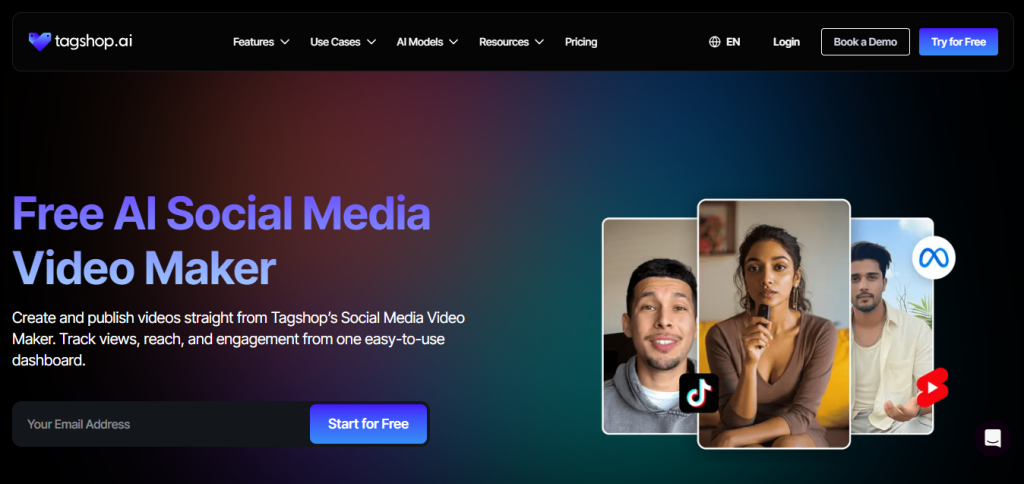
Built for modern social platforms. Tagshop.ai reduces production costs while maintaining authentic, creator-style output that performs well on ads and organic feeds.
Key value-driven features include:
- URL to Video: Instantly convert product or landing page URLs into ready-to-publish videos
- AI Twin Generator: Create a digital twin to represent your brand consistently
- AI UGC Video Generator: Generate creator-style videos without hiring influencers
- AI Shorts Maker: Produce short-form videos optimized for reach and retention
- AI Reel Generator: Create scroll-stopping Reels for Instagram and Facebook
- AI Video Avatar Generator: Use lifelike avatars for scalable video content
Pros
- Focused on AI-driven UGC-style video creation
- Create multiple videos at once to increase scalability
- Converts existing content/URLs into videos quickly
- Variety of AI templates & output formats
- Centralized platform for multi-channel video content
Cons
- May require learning for advanced feature use
- Less manual creative control compared to a traditional editor.


The video you created for us truly exceeded our expectations - it's fantastic!
"Every frame was not only engaging but also beautifully crafted, clearly showing the high level of creativity and effort that went into its production. We achieved CTR of over 2%, and with a cost per click of just $0.20, the effectiveness of your work is undeniable."
Esma E.
Influencer Marketing

Seamless AI UGC video and image generation tool
"I work in the API security space, but I have always been curious about exploring different AI tools whether for generating images, videos, or creative content. UGC is something every brand needs nowadays, and I have tried many AI video tools. What I like about Tagshop AI is its simplicity. It’s easy to use, not complicated, and even someone without an AI background can get started quickly. That makes it a very user-friendly AI UGC video tool."
Sivan Michaeli-Roimi
VP Marketing @Pynt | Founder of Heyou.io

Best image to Product holding video generator for me
"I used Tagshop AI 2 days ago. Create an ai ugc product holding video with the tool. I have literally found the tool easy to use, with no complex functionality inside it. They have their own image generation model, where you can first generate a product image or upload one, and then you can also create a video for the same product. I like this idea, pretty cool, but let’s see how I can move to their plan."
Alon Michaeli
Head of Revenue AI at DealHub

Avatar looks realistic. Helpful to generate high-quality ai ugc videos.
"I've been using Tagshop AI as an AI ugc video generation tool for 1 month, and it's working well for me. I love the variety of avatars in their avatar library. The best part I have got in this tool is their editor, simple and clean look, and easy to use. Now, I don't need to switch tabs to edit the video."
Yuliia Kolomiiets
VP of Marketing
Multi-lingual features in the tool are pretty amazing.
"As my targeted audience is from the USA, Germany and Italy, their multilingual feature is helpful in this situation. I can create multiple avatar videos in different languages. So this is the benefit when you are targeting a wide audience."
Anirudh
Head of Digital Marketing

Time Saving and Affordable Tool
"The tool is super quick while creating the ai ugc videos. I like the editor within the tool, you don't have to switch to another tab."
Stephen Mathew
Marketing Manager

AI influencer becomes easy to create with Tagshop AI
"With the Tagshop AI, I have created a set of AI avatar videos that are now working for my clients. I am happy that I have found the fastest way to create AI avatars. The tool is quick and easy to use. I mean beginner-friendly, even a non-ai person can also operate this."
Kazi Mainuddin
Content Marketer
4. Steve.AI
Steve.AI is a platform that focuses on turning text, scripts, or ideas into videos with minimal effort. It serves as a practical social media video generator for users who want quick video outputs without deep editing skills. With its template library and easy customization options, Steve.AI helps creators produce short clips suitable for ads, announcements, and basic promotional content.
The tool’s workflow blends automation with user control, allowing import of scripts and automatic scene suggestions. It also offers a varied asset library and simple drag-and-drop editing, making video creation more accessible for small businesses, solopreneurs, and social teams. As a social media video-making tool, it fits into workflows where simplicity and speed are priorities.

Here are the main features:
- Script-to-video generation
- Scene suggestions
- Asset library
- Drag-and-drop customization
Pros
- Quick text-to-video workflow
- Good for announcements/ads
- Easy for non-editors
Cons
- Less control for detailed edits
- Output can feel generic
5. Pictory
Pictory is an AI-powered platform designed to turn scripts, articles, or long-form content into engaging short videos. As a social media video-making tool, it helps creators produce social clips without advanced editing skills. Using automated scene selection and AI summarization, Pictory simplifies the video creation process for blogs, podcasts, and long videos that need repackaging for social feeds.
The platform offers features like text-to-video conversion, automatic captioning, and stock media integration. These tools help teams create polished content quickly for platforms like Facebook, Instagram, and YouTube.

Key Features
- Long-form to short-form video repurposing
- Automated captioning
- Script or article conversion
- Stock media library
Pros
- Great for repurposing existing content
- Strong automation
- Time-saving for bloggers/podcasters
Cons
- Not ideal for fully custom branding
- Less drag-and-drop control
6. PlayPlay
PlayPlay is a web-based video creation platform tailored for teams that need consistent, polished social content. It emphasizes ease of use with customizable templates, intuitive editing, and support for multiple formats. As a social media video maker, it helps users quickly produce videos that fit platform-specific requirements without manual editing complexity.
The tool is built for communicators, internal teams, and marketing departments that regularly publish content across channels. With features like branded templates, automatic resizing, and collaborative workflows, PlayPlay streamlines video production for stories, ads, and feed posts. It also serves as a reliable social media video generator for those who need structured outputs with minimal setup.

Key Features
- Branded templates
- Collaborative editing
- Auto resizing
- Team workflows
Pros
- Structured workflow for teams
- Good brand consistency
- Helps scale social outputs
Cons
- Template reliance may limit creativity
- Not as deeply automated as AI-first tools
7. Promo
Promo is built for marketers who want to create social videos quickly using pre-built visual assets. Instead of starting from scratch, users can assemble videos using stock clips, text overlays, and music designed for social platforms. This makes it a practical choice among Affordable social media video makers for teams focused on speed and consistency.
The platform supports common social formats and helps streamline content creation for ads and organic posts. It works well as a social media video generator when the goal is to publish frequently without managing complex timelines or edits.

Key Features
- Stock clip & music library
- Social-focused templates
- Direct publishing support
- Branding options
Pros
- Great for ads & product highlights
- Easy visual storytelling
- Broad asset availability
Cons
- Features skew toward general use
- Less AI automation
8. Imagine
Imagine is an AI-powered creative platform that helps users turn ideas, prompts, and assets into dynamic videos without traditional editing workflows. It includes an AI social media video maker that simplifies video creation for platforms like Instagram, TikTok, and YouTube Shorts by automating key production steps. Users can start with text, images, or scripts and let the platform generate engaging video content in minutes.
This tool supports various AI-driven workflows, from text-to-video generation to image-to-video transformations and short-form content optimized for social feeds. Automatic aspect-ratio options help ensure each clip fits the intended platform’s requirements without manual resizing.

Key Features
- Prompt-to-video generation
- Text/asset inputs
- Automatic formatting
- Multi-platform output
Pros
- Embraces generative workflows
- Fast video creation
- Flexible starting points
Cons
- Creative direction varies by prompt quality
- May need refinement post-generation
9. Renderforest
Renderforest focuses on helping brands build recognizable visual content through videos that emphasize branding and motion design. Instead of manual editing, users work with structured scenes where text, visuals, and animations come together quickly. As a social media video maker, it supports teams that want repeatable formats for social posts without starting from a blank canvas.

Key Features
- Video + animation templates
- Motion graphics
- Custom branding
- Export presets
Pros
- Strong animated elements
- Good for brand storytelling
- All-in-one visual toolset
Cons
- Template-forward (less creative freedom)
- Animation focus may not fit all use cases
10. ClipFly
ClipFly is an AI-assisted video editor designed to simplify short-form content creation for social platforms. It fits well among social media video makers for users who want quick results without dealing with complex editing timelines. The platform focuses on guided workflows that help turn raw clips into platform-ready videos efficiently.
Instead of manual frame-by-frame edits, ClipFly relies on smart presets and automation to speed up production. This makes it suitable for creators and small teams aiming to maintain consistency across social channels with limited effort.

Key features of ClipFly include:
- AI-powered video editing to automate cuts and transitions
- Ready-to-use templates optimized for social platforms
- Drag-and-drop interface for fast customization
- Automatic pacing and formatting for short-form videos
- Support for promotional clips, ads, and social stories
Pros
- Speeds up simple edits
- Beginner-friendly
- Works well for quick social clips
Cons
- Not deeply automated AI
- Limited advanced controls
11. WeVideo
WeVideo is a cloud-based video editor that helps teams and creators produce engaging content without complex software. As an Affordable social media video maker, it offers tools to edit clips, add motion titles, and tailor videos for platforms like Instagram, TikTok, and YouTube without hefty production overheads.
Key features of WeVideo:
- Cloud-based editor with collaborative access
- Templates and motion titles optimized for social feeds
- Drag-and-drop timeline for intuitive editing
- Stock media library for visuals and music
- Export presets for Instagram, Facebook, TikTok formats
Pros:
- Works entirely in the browser — no installs needed
- Good balance of control and simplicity
- Collaboration tools for team workflows
Cons:
- Advanced features may feel limited for professional editors
- Some templates and stock assets are locked behind higher plans
12. Vidio
Vidio is an AI-centered video creation platform that helps users turn scripts, prompts, or concepts into short social clips. As one of the Affordable social media video makers, Vidio focuses on automating key editing tasks so creators can produce videos quickly without deep technical skills.
The platform uses AI to simplify editing, scene transitions, and pacing, making it easier to generate content suited for feeds, stories, and ads. This approach helps teams maintain a steady flow of visual content without needing extensive editing expertise or large budgets.

Key features of Vidio include:
- Script-to-video generation with automated scene suggestions
- Smart pacing and transitions for short-form content
- Templates designed for social platforms
- Simple export options for Instagram, TikTok, and YouTube formats
Pros
- AI accelerates routine editing
- Good for short-form feeds
- Easy to use
Cons
- Less control for custom styles
- Output quality varies by script input
What Are Some Key Features To Look in A Social Media Video Maker
When evaluating Affordable social media video makers, it’s important to look beyond pricing and focus on features that actually support speed, scalability, and performance. Below are the key features explained separately, so readers can clearly understand what each one does and why it matters today.
1. AI Avatars
AI avatars allow brands to create videos without recording real people every time. These avatars can speak scripts, represent the brand, and appear consistently across videos. This feature helps reduce dependency on creators, shoots, and reshoots while maintaining a human-like presence in videos.
2. Templates & Presets
Templates and presets provide ready-made video structures for different use cases like ads, announcements, and product highlights. For Affordable social media video makers, templates save time and ensure videos follow platform-friendly layouts without starting from scratch.
3. AI-Powered Editing
AI-powered editing automates tasks like scene selection, transitions, pacing, and timing. This feature enables non-editors to create polished videos quickly and helps teams produce more content with less effort.
4. Vertical / Short-Form Formats
Support for vertical and short-form formats is essential for platforms like Instagram Reels, TikTok, and YouTube Shorts. Tools that prioritize these formats ensure videos are optimized for reach, engagement, and mobile viewing.
5. Auto Captions
Auto captions automatically generate subtitles for videos. Since many users watch social content without sound, captions improve accessibility, retention, and overall video performance across platforms.
6. Stock Media Library
A built-in stock media library gives access to royalty-free videos, images, music, and sound effects. This feature speeds up content creation and reduces the need to source assets externally.
7. Platform Export Presets (Reels, Shorts, TikTok)
Platform export presets allow users to download videos in the correct size, resolution, and format for each social platform. This removes the need for manual resizing and ensures videos meet platform specifications.
8. Collaboration Tools
Collaboration tools enable multiple team members to review, edit, comment, and approve videos within the same workspace. This feature is especially important for brands and agencies managing frequent content production.
Tips for Creating Better Videos With Affordable Tools
Creating high-performing videos doesn’t always require expensive software or large production teams. With the right approach, Affordable social media video makers can help you produce engaging content consistently while staying within budget. Below are practical, expanded tips to help you get better results from these tools.
1. Use templates to save time
Templates are designed around proven social media structures. Instead of starting from scratch, use templates for ads, reels, or promos to speed up production. Most affordable tools offer pre-built layouts that already follow platform best practices, helping you focus more on messaging than design.
2. Start with vertical (9:16) formats for Reels and Shorts
Vertical videos perform best on Instagram Reels, TikTok, and YouTube Shorts. Creating in 9:16 from the beginning avoids awkward cropping later. Many Affordable social media video makers are optimized for vertical-first creation, making this an easy win.
3. Add captions automatically
A large portion of users watch videos without sound. Auto captions improve accessibility, increase watch time, and keep viewers engaged longer. Using built-in caption tools also saves hours compared to manual subtitle creation.
4. Repurpose one video across platforms
One strong video can be reused across multiple channels. Adjust aspect ratios, captions, or CTAs to fit each platform. This approach helps maximize reach while reducing production effort, especially when using AI-powered editing tools.
5. Keep videos short and punchy (10–30 seconds)
Short-form videos are easier to consume and more likely to be watched till the end. Focus on a single idea, hook viewers early, and avoid unnecessary details to maintain attention.
6. Use trending music and sound effects
Trending audio increases discoverability on social platforms. Many Affordable social media video makers include licensed music libraries or allow easy integration of popular sounds to boost engagement.
Conclusion
Creating high-quality social videos no longer requires big budgets or complex production setups. With the rise of Affordable social media video makers, brands, marketers, and creators can now produce engaging, platform-ready content faster and more efficiently. From AI-powered editing and templates to captions and vertical formats, these tools simplify every step of the process. The key is choosing a solution that matches your content goals, workflow, and scale. When used strategically, affordable video tools help you stay consistent, adapt to trends, and compete effectively across social platforms without overspending.
Frequently Asked Questions
Tagshop is the best and most affordable social media video maker, loaded with features such as image-to-video, AI scriptwriting, multilingual videos, URL-to-video, etc.
Tools like Tagshop, Clipfly, Vidio,etc. provide enough features to create solid social content, especially for beginners. They often include templates, basic editing, and export presets suitable for social feeds.
Tools that focus on vertical formats and short-form workflows excel here, and Tagshop is perfect for such cases. With an advanced editor and engaging templates, you can create scroll-stopping reels and tiktok videos at scale.
Short-form editors optimized for vertical 9:16 outputs work best for YouTube Shorts as well. Software like CapCut (with direct export) and online tools with customizable vertical presets are strong options.
Absolutely. Many affordable and free tools now offer advanced features like color correction, transitions, auto captions, and export presets that deliver professional-looking videos without expensive software.
Yes — a growing number of budget tools include AI-powered editing like auto scene selection, script-to-video, auto captions, and template suggestion features. Even free editors (e.g., CapCut) now integrate AI workflows.
Yes. Tools like CapCut (freemium with AI elements), Clipchamp (free plan with templates), and other AI platforms like Pika Labs or Runway (text-to-video experimental tools) provide free or trial-based AI video features.
Tagshop allows quick product showcase templates and UGC-style AI videos, making it a well-suited tool for eCommerce. These help generate promotional content quickly from product URLs or scripts.
Key features include export presets for social platforms, vertical formats, auto captions, stock media libraries, templates, and basic automation like auto edits and AI scripts. These help speed up creation without manual effort.
Yes — most affordable video makers include export options or presets for Facebook, TikTok, and YouTube, helping ensure your ads meet each platform’s technical specifications.
Many tools offer free plans; paid tiers typically start from around $5–$30 per month for basic access, with more advanced AI or export features in higher tiers.
Most affordable tools include built-in royalty-free music libraries so you can safely add soundtracks without worrying about copyright strikes on social platforms.
Mobile-friendly editors like CapCut, Clipchamp (web on mobile), and similar apps provide on-the-go editing for social videos. These let you edit, apply effects, and export directly from phones.
Tagshop supports features like templates, auto captions, AI edits, and platform presets, which significantly speed up production, helping you publish more videos in less time.
Tools like Tagshop are designed for beginners with intuitive drag-and-drop interfaces, tutorials, and guided templates that make video creation simple even without prior experience.
Written by:

Neeraj is passionate about reshaping brand storytelling through AI-powered UGC videos. As the Founder he helps brands unlock authentic, creator-style video content that drives results - without the traditional time, cost, or complexity. His approach blends AI innovation with marketing performance to scale engagement efficiently.