

Generador de vídeo AI PixVerse V6
PixVerse V6 es el modelo de vídeo con IA insignia de AIsphere y el mejor valorado en la clasificación independiente de conversión de imagen a vídeo de Artificial Analysis, por delante de Veo 3.1, Kling 3.0 y Sora 2. Ofrece audio nativo, más de 20 controles de cámara cinematográficos, narración multi-toma y clips de hasta 15 segundos, con uno de los costes por minuto más bajos entre los modelos de gama alta. Disponible en Tagshop AI.
Mira lo que crea PixVerse V6
Todos los vídeos de esta galería se generaron con PixVerse V6 en Tagshop AI, a partir de un texto de ejemplo o una imagen del producto.
¿Qué es PixVerse V6?
PixVerse V6 is AIsphere's flagship AI video generation model, released March 2026, and the highest-rated model on Artificial Analysis's independent Image-to-Video Rankings with an ELO score of 1,343, ahead of Google's Veo 3.1, Kuaishou's Kling 3.0 Omni, and OpenAI's Sora 2. It generates up to 15 seconds of 1080p video with native audio (voice, ambient sound, and effects synced to the action), automatic multi-shot storytelling, and over 20 cinematic camera movements, tracking, dolly, crane, POV, and fisheye, all directly from text prompts. PixVerse V6 also delivers among the best cost-efficiency of any top-ranked model. Available on Tagshop AI with a monthly subscription from $19/month and full commercial licensing on all paid plans.
PixVerse V6: Especificaciones técnicas
Parámetros exactos para la generación de vídeo PixVerse V6 en Tagshop AI
Desarrollador de modelos
AIsphere
Fecha de lanzamiento
30 de marzo de 2026
Tiempo de generación
10-15 minutos
Duración del video (nativo)
Hasta 15 segundos
Duración del vídeo (Agente de vídeo)
Clips encadenados de hasta 1 minuto
Opciones de resolución
Hasta 1080p
Relaciones de aspecto
16:9 · 9:16 · 1:1 · 4:3 · 3:4 · 2:3 · 3:2 · 21:9
Audio nativo
Sí, voz, sonido ambiental y efectos sincronizados con la acción en pantalla.
Narración con múltiples planos
Sí, escenas estructuradas automáticas
Control de la cámara
Más de 20 movimientos: seguimiento, dolly, grúa, POV, ojo de pez
Coherencia de los personajes
Sí, estabilidad multisujeto a través de cortes
Texto dentro del marco
Sí, multilingüe, con una ubicación y un estilo consistentes.
Clasificación independiente
ELO 1.343, n.° 1 de los modelos clasificados (Análisis Artificial, Clasificaciones de Imagen a Vídeo, abril de 2026)
Modos de entrada
Texto a vídeo · Imagen a vídeo
Licencia comercial
Uso comercial completo en todos los planes de pago.
Filigrana
Sin marca de agua en todos los planes de pago.
¿Por qué las marcas eligen PixVerse V6?
Cuatro capacidades que convierten a PixVerse V6 en el modelo de vídeo con IA mejor valorado disponible en Tagshop AI.
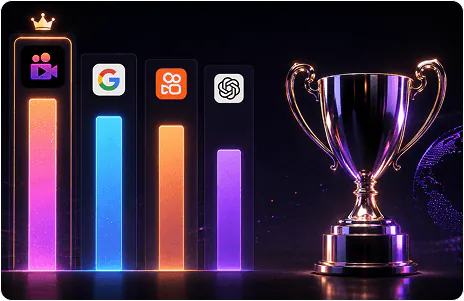
No es nuestra afirmación. El referente independiente.
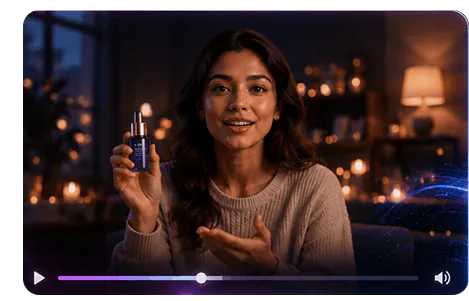
Voz, ambiente y efectos. Generados con el vídeo.
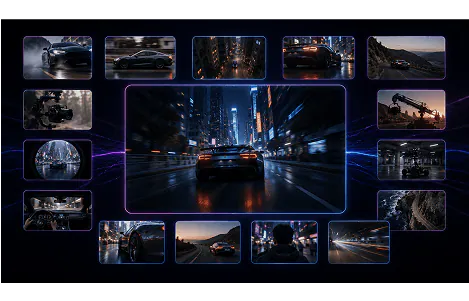
Dirige la toma como un director de fotografía.
Cómo generar con PixVerse V6
Texto, imagen o texto dentro del marco: tres formas de dirigir PixVerse V6
Texto a vídeo
Describe tu escena con indicaciones específicas de la cámara (por ejemplo, movimiento lento de la cámara, plano secuencia en primera persona, plano con grúa elevándose sobre la escena), diálogos o pistas de audio y detalles visuales. La comprensión mejorada de las indicaciones de PixVerse V6 traduce las instrucciones detalladas en resultados precisos.
Imagen a vídeo
Sube una imagen de referencia y anímala con el control de movimiento y cámara de PixVerse V6, conservando la identidad visual de la imagen original a la vez que añades movimiento cinematográfico.
Texto en pantalla multilingüe
Incluya el texto exacto que desea que se muestre en el marco (señales, subtítulos, títulos) y especifique el idioma; el inglés, el chino y otros idiomas se mostrarán con una ubicación y un estilo uniformes.
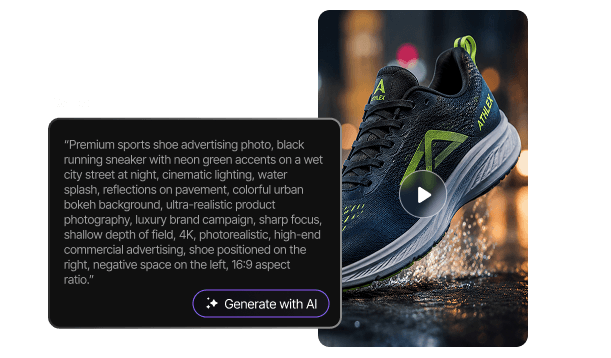
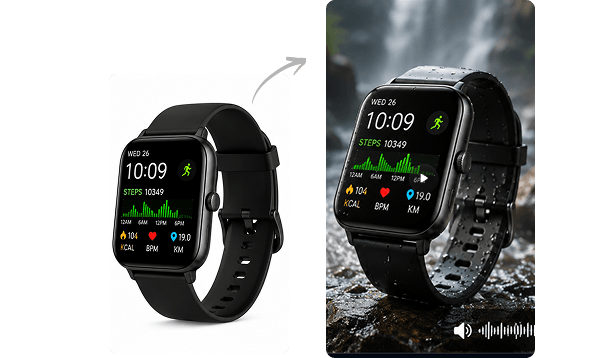

Indicaciones listas para usar para PixVerse V6
Copia cualquier indicación directamente en Tagshop AI. PixVerse V6 responde mejor a la dirección específica de la cámara y a las señales de audio.
Prompt: "La cámara realiza un lento movimiento de grúa que asciende desde el nivel del suelo para revelar un producto sobre un pedestal, iluminación lateral dramática, el sonido se intensifica con un crescendo orquestal, 16:9"
Prompt: "Plano inicial en primera persona entrando en un estudio moderno. Corte a un plano secuencia junto a un presentador que habla sobre el producto. Corte a un primer plano con travelling que enfoca un detalle del producto. Iluminación y sonido consistentes durante todo el vídeo, 9:16".
Prompt: Dos personas conversando en la encimera de una cocina, diálogo natural de ida y vuelta, sonidos ambientales de la cocina, la cámara mantiene un plano fijo de dos personas con un sutil movimiento de cámara en mano, formato 16:9.
Prompt: "Una mano toma un producto y demuestra su característica principal, con un clic satisfactorio y efectos de sonido mecánicos sincronizados con la acción, iluminación de estudio nítida, ángulo de cámara macro, 1:1".
Prompt: "Un presentador habla directamente a la cámara en chino, en pantalla aparece el nombre del producto y el eslogan en caracteres chinos, fondo moderno y limpio, presentación segura, 9:16"
Prompt: "Toma en primera persona con lente ojo de pez, moviéndose rápidamente a través de un bullicioso mercado callejero, energía dinámica, sonido ambiental en capas de la multitud y los vendedores, ritmo de edición acelerado, 9:16"
Prompt: Tres compañeros de trabajo alrededor de una mesa de conferencias; la cámara recorre lentamente al grupo captando a cada interlocutor. Conversación natural y superpuesta. Ambiente de oficina profesional. Formato 16:9.
Prompt: "Un travelling se acerca a la silueta de un producto con una dramática contraluz, un audio ambiental que genera tensión y un momento de revelación sincronizado con un éxito musical mientras la luz inunda el encuadre, formato 21:9".
Cómo crear vídeos con IA usando PixVerse V6 en Tagshop AI
Desde una sugerencia de texto hasta un clip listo para publicar con audio sincronizado.
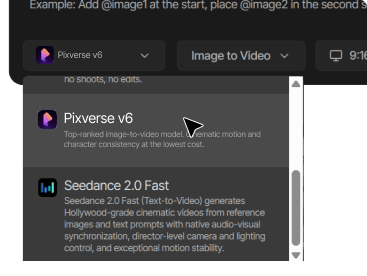
Abrir etiqueta AI
Ve a tagshop.ai → Generador de activos → Elige un modelo. Selecciona PixVerse V6 de la lista de modelos.
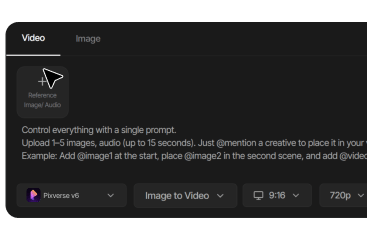
Escribe tu consigna
Incluya la dirección específica de la cámara (indique el movimiento de la cámara: dolly, grúa, seguimiento, POV, ojo de pez), la descripción de la escena y cualquier diálogo o señal de audio.
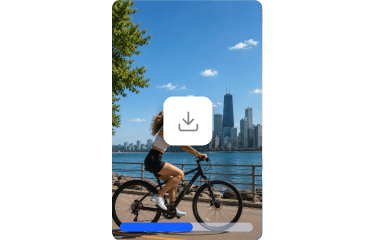
Generar y exportar
Generación inmediata, lista en 10-15 minutos. El audio se genera automáticamente con el vídeo. Descarga sin marca de agua y con licencia comercial completa.
Qué puedes crear con PixVerse V6
Desde la selección de modelos basada en evidencia hasta películas de marca cinematográficas, PixVerse V6 maneja todos los formatos de alto valor.

Selección de modelos basada en la evidencia
Para los equipos que necesitan justificar sus decisiones sobre herramientas creativas con datos, no con opiniones, la clasificación ELO independiente de PixVerse V6 proporciona una prueba fehaciente de calidad.

Pruebas de alto volumen y rentables
Un rendimiento de referencia de primera clase a un bajo coste por minuto hace que las pruebas creativas a gran escala sean financieramente sostenibles sin comprometer la calidad del resultado.

Películas de marca cinematográficas
Más de 20 controles de cámara y la narración visual con múltiples tomas ofrecen una calidad de producción propia de un director profesional a partir de una sola indicación.

Diálogo y contenido del presentador
La generación de audio nativa hace que PixVerse V6 esté listo para anuncios con presentadores al estilo UGC y demostraciones de productos sin necesidad de trabajo de postproducción de audio.

Campañas globales multilingües
La representación de texto en varios idiomas dentro del marco permite realizar campañas localizadas sin necesidad de un diseño independiente para cada mercado.

Portafolio de la agencia
La clasificación de calidad verificada de forma independiente ofrece a las agencias una respuesta creíble y comparable cuando los clientes preguntan por qué se elige este modelo.
PixVerse V6 frente a otros modelos de vídeo con IA en Tagshop AI
Compara PixVerse V6 con Veo 3.1, Kling 3.0 Omni y Sora 2: elige el modelo adecuado para tus necesidades creativas.
 PixVerse V6
  Veo 3.1
  Kling 3.0 Omni
  Sora 2
 Más modelos de IA en Tagshop AI
Todos los modelos de vídeo de IA de vanguardia en una sola plataforma, y cambia entre modelos cuando quieras.
Veo 3
Modelo de IA cinematográfica de Google DeepMind. Diálogos nativos, audio nítido y calidad visual superior.
Blade AI 3.0
Portavoz de IA con una interpretación coherente del personaje y sincronización labial precisa para anuncios de vídeo UGC de alta conversión.
Seedance 2.0
Anuncios de comercio electrónico con múltiples tomas, audio nativo y movimiento ajustable, desde la imagen del producto hasta el vídeo de alta calidad.
Explorar herramientas relacionadas


Lo que dicen las marcas sobre PixVerse V6 en Tagshop AI



El vídeo que creaste para nosotros superó con creces nuestras expectativas, ¡es fantástico!
"Cada fotograma no solo era atractivo, sino también exquisitamente diseñado, lo que demuestra claramente el alto nivel de creatividad y dedicación invertido en su producción. Logramos un CTR superior al 2%, y con un coste por clic de tan solo 0,20 $, la efectividad de su trabajo es innegable."
Esma E.
Marketing de influencers


Herramienta de generación de imágenes y vídeos UGC con IA sin fisuras
"Trabajo en el ámbito de la seguridad de API, pero siempre me ha interesado explorar diferentes herramientas de IA para generar imágenes, vídeos o contenido creativo. El contenido generado por el usuario (UGC) es esencial para cualquier marca hoy en día, y he probado muchas herramientas de vídeo con IA. Lo que me gusta de Tagshop AI es su sencillez. Es fácil de usar, no es complicado, e incluso alguien sin experiencia en IA puede empezar rápidamente. Esto la convierte en una herramienta de vídeo UGC con IA muy intuitiva."
Sivan Michaeli-Roimi
Vicepresidente de Marketing en Pynt | Fundador de Heyou.io


Mejor generador de imágenes para vídeos de productos
"Usé Tagshop AI hace dos días. Creé un video de producto generado por el usuario con IA usando la herramienta. Me pareció muy fácil de usar, sin funciones complejas. Tienen su propio modelo de generación de imágenes, donde primero puedes generar o subir una imagen del producto y luego crear un video para el mismo. Me gusta la idea, es genial, pero veremos cómo puedo adaptarme a su plan."
Alon Michaeli
Responsable de IA de ingresos en DealHub


El avatar tiene un aspecto realista. Resulta útil para generar vídeos UGC de IA de alta calidad.
"Llevo un mes usando Tagshop AI como herramienta de generación de vídeos UGC con IA y me funciona de maravilla. Me encanta la variedad de avatares en su biblioteca. Lo mejor de esta herramienta es su editor: sencillo, limpio y fácil de usar. Ahora ya no necesito cambiar de pestaña para editar el vídeo."
Yuliia Kolomiiets
Vicepresidente de Marketing


Las funciones multilingües de la herramienta son realmente increíbles.
"Como mi público objetivo se encuentra en Estados Unidos, Alemania e Italia, su función multilingüe me resulta muy útil. Puedo crear varios vídeos con avatares en diferentes idiomas. Esta es una gran ventaja cuando se busca llegar a un público amplio."
Anirudh
Jefe de Marketing Digital


Herramienta que ahorra tiempo y es asequible
"La herramienta es rapidísima para crear vídeos UGC con IA. Me gusta el editor integrado; no hace falta cambiar de pestaña."
Stephen Mathew
Gerente de Marketing


Crear un influencer con IA es fácil con Tagshop AI.
"Con Tagshop AI, he creado una serie de vídeos con avatares de IA que ahora funcionan para mis clientes. Me alegra haber encontrado la forma más rápida de crear avatares de IA. La herramienta es rápida y fácil de usar. Es tan sencilla que hasta un principiante puede manejarla sin problemas."
Kazi Mainuddin
Especialista en marketing de contenidos


Hemos logrado reducir con éxito nuestro tiempo de rodaje tras utilizar Tagshop AI.
"Tagshop AI nos ha ayudado a reducir drásticamente el tiempo que dedicamos a fotografiar nuestros productos. La función de Gemelo Digital/Gemelo de IA nos permite crear imágenes nítidas de los productos sin tener que configurar luces, cámaras ni fondos cada vez. Simplemente subimos algunas imágenes y la herramienta genera resultados de alta calidad, listos para anuncios o redes sociales. Para un equipo de marketing pequeño como el nuestro, esto supone un ahorro de horas cada semana y facilita enormemente la creación de contenido."
Arpan Shah
Director general


El panel de Tagshop AI está muy bien organizado, incluso para alguien principiante en la creación de videos como yo.
"Tagshop AI ha hecho que toda la creación de videos sea mucho más fácil para mí, especialmente al no tener una gran experiencia en edición. El panel es limpio y está muy bien organizado, lo que me ayudó a entender rápidamente el flujo de trabajo. Me encantó lo sencillo que es generar contenido, editar videos y navegar por las diferentes funciones sin sentirme confundida. La plataforma ahorra tiempo y hace que todo el proceso sea fluido y eficiente. En general, es una herramienta apta para principiantes que ofrece resultados de aspecto profesional con un esfuerzo mínimo."
Aygul M.
Estratega de PR Digital


Para nosotros, Tagshop AI es la forma más rápida de crear anuncios de video UGC de alta conversión
"Tagshop AI actualmente nos está ayudando a producir anuncios de video estilo UGC rápidamente. Subir un enlace de producto y dejar que la IA genere automáticamente guiones, avatares y videos completos nos ahorra una cantidad increíble de tiempo. Los avatares realistas y la clonación de voz se sienten naturales, y las funciones multilingües facilitan las campañas internacionales para nosotros. Actualmente producimos más de 90 videos diarios con variaciones para pruebas A/B sin necesidad de filmación, creadores ni edición."
Arina K.
Directora de Marketing


Los anuncios de video estilo UGC se vuelven fáciles gracias al flujo de trabajo del agente de video con IA.
"Con el tiempo también hemos desarrollado el enfoque para generar videos UGC con IA para nuestras plataformas publicitarias. Recientemente exploramos la nueva función de generación de videos a través del agente de video con IA, y el inteligente agente de IA nos genera guiones, elementos visuales y videos en pocos minutos. Así que sí, podemos decir que estamos ahorrando mucho tiempo de producción de video, generación de video, simplemente chateando a través del agente. Así que creo que ya estamos eliminando muchos procesos típicos gracias al agente."
Bhavik B.
Cofundador
Preguntas frecuentes sobre PixVerse V6
Todo lo que necesitas saber sobre PixVerse V6 en Tagshop AI.
¿Qué es PixVerse V6?
¿Es PixVerse V6 realmente el modelo de vídeo mejor valorado?
¿Cuánto cuesta PixVerse V6 en comparación con otros modelos de gama alta?
¿PixVerse V6 genera audio?
¿Qué controles de cámara admite PixVerse V6?
¿Qué duración de vídeo produce PixVerse V6?
¿En qué se diferencia PixVerse V6 de PixVerse V5?
¿PixVerse V6 admite varios idiomas?
¿Puedo usar PixVerse V6 para publicidad comercial?

El modelo de vídeo con IA mejor valorado, evaluado de forma independiente. Audio nativo. Más de 20 controles de cámara.