

Generatore video AI PixVerse V6
PixVerse V6 è il modello di punta di AIsphere per la creazione di video tramite intelligenza artificiale, nonché il modello con il punteggio più alto nella classifica indipendente Image-to-Video Rankings di Artificial Analysis, davanti a Veo 3.1, Kling 3.0 e Sora 2. Offre audio nativo, oltre 20 controlli cinematografici per la telecamera, narrazione multi-inquadratura e clip fino a 15 secondi, a uno dei costi al minuto più bassi tra i modelli di fascia alta. Disponibile su Tagshop AI.
Guarda cosa crea PixVerse V6
Ogni video in questa galleria è stato generato con PixVerse V6 su Tagshop AI, a partire da un testo o da un'immagine del prodotto.
Cos'è PixVerse V6?
PixVerse V6 is AIsphere's flagship AI video generation model, released March 2026, and the highest-rated model on Artificial Analysis's independent Image-to-Video Rankings with an ELO score of 1,343, ahead of Google's Veo 3.1, Kuaishou's Kling 3.0 Omni, and OpenAI's Sora 2. It generates up to 15 seconds of 1080p video with native audio (voice, ambient sound, and effects synced to the action), automatic multi-shot storytelling, and over 20 cinematic camera movements, tracking, dolly, crane, POV, and fisheye, all directly from text prompts. PixVerse V6 also delivers among the best cost-efficiency of any top-ranked model. Available on Tagshop AI with a monthly subscription from $19/month and full commercial licensing on all paid plans.
PixVerse V6: Specifiche tecniche
Parametri esatti per la generazione di video PixVerse V6 su Tagshop AI
Sviluppatore di modelli
Astronomia
Data di rilascio
30 marzo 2026
Tempo di generazione
10-15 minuti
Durata del video (nativa)
Fino a 15 secondi
Durata del video (Agente video)
Fino a 1 minuto, clip in sequenza
Opzioni di risoluzione
Fino a 1080p
rapporti d'aspetto
16:9 · 9:16 · 1:1 · 4:3 · 3:4 · 2:3 · 3:2 · 21:9
Audio nativo
Sì, voce, suoni ambientali ed effetti sincronizzati con l'azione sullo schermo.
Narrazione a più inquadrature
Sì, scene strutturate automatiche
Controllo della telecamera
Oltre 20 movimenti: tracking, dolly, crane, POV, fisheye
coerenza del personaggio
Sì, stabilità multi-soggetto attraverso i tagli
testo all'interno della cornice
Sì, multilingue, posizionamento e stile coerenti
classifiche indipendenti
ELO 1.343, n. 1 tra i modelli classificati (Analisi artificiale, Classifica immagini-video, aprile 2026)
Modalità di input
Da testo a video · Da immagine a video
Licenza commerciale
Utilizzo commerciale completo su tutti i piani a pagamento.
Filigrana
Senza filigrana su tutti i piani a pagamento.
Perché i brand scelgono PixVerse V6
Quattro funzionalità che rendono PixVerse V6 il modello video AI con il punteggio più alto disponibile su Tagshop AI
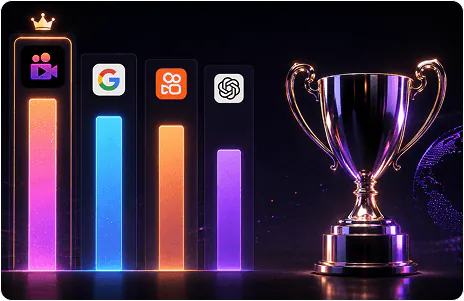
Non è una nostra affermazione. È un benchmark indipendente.
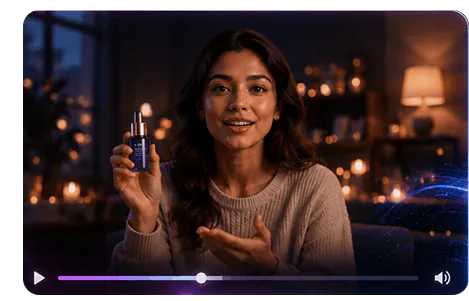
Voce, atmosfera ed effetti. Generati insieme al video.
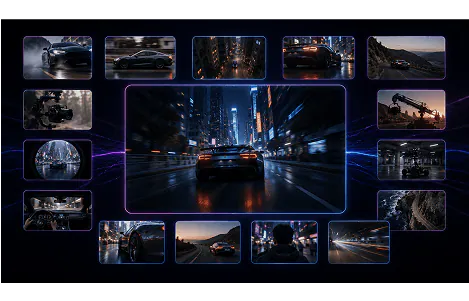
Dirigi la ripresa come un direttore della fotografia.
Come generare con PixVerse V6
Testo, immagine o testo in-frame: tre modi per indirizzare PixVerse V6
Testo in video
Descrivi la tua scena con indicazioni specifiche sulla direzione della telecamera (ad esempio, carrello che si avvicina lentamente, ripresa in soggettiva, ripresa con gru che sale dall'alto), dialoghi o segnali audio e dettagli visivi. La migliore comprensione dei comandi di PixVerse V6 traduce le indicazioni dettagliate in un output preciso.
Immagine in video
Carica un'immagine di riferimento e animala con i controlli di movimento e telecamera di PixVerse V6, preservando l'identità visiva dell'immagine originale e aggiungendo al contempo un movimento cinematografico.
Testo multilingue sullo schermo
Includi il testo esatto che desideri venga visualizzato all'interno del riquadro (segnaletica, didascalie, titoli) e specifica la lingua: inglese, cinese e altre lingue verranno visualizzate con posizionamento e stile uniformi.
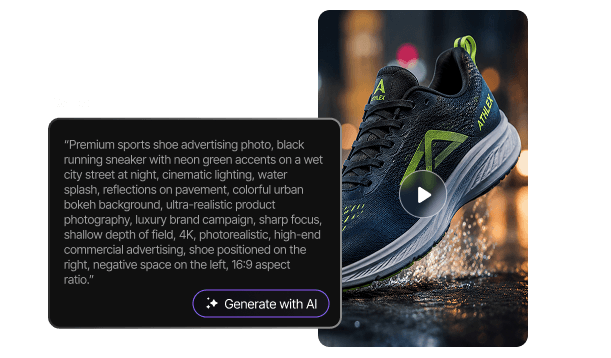
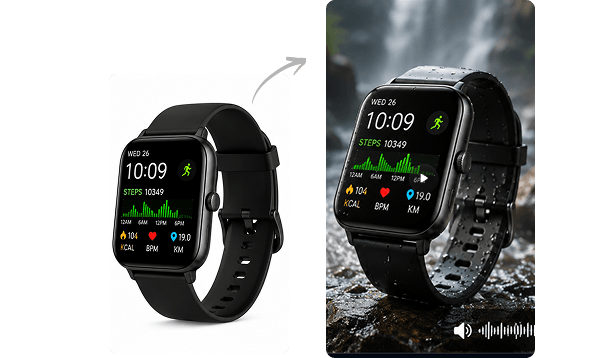

Prompt pronti all'uso per PixVerse V6
Copia qualsiasi suggerimento direttamente in Tagshop AI. PixVerse V6 risponde al meglio a indicazioni specifiche della telecamera e segnali audio.
Prompt: "La telecamera esegue una lenta ripresa con gru che sale dal livello del suolo per rivelare un prodotto su un piedistallo, illuminazione laterale drammatica, crescendo orchestrale nell'audio, formato 16:9"
Prompt: "Inquadratura iniziale in soggettiva di una persona che entra in uno studio moderno. Stacco su una carrellata accanto a un presentatore che parla del prodotto. Stacco su un primo piano con carrello che si sofferma sui dettagli del prodotto. Illuminazione e audio uniformi per tutta la durata, 9:16"
Prompt: "Due persone che conversano al bancone della cucina, dialogo naturale e spontaneo, suoni ambientali della cucina, la telecamera mantiene un'inquadratura fissa a due con lievi movimenti a mano libera, formato 16:9"
Prompt: "Una mano prende un prodotto e ne dimostra la caratteristica principale, con un soddisfacente clic e effetti sonori meccanici sincronizzati all'azione, illuminazione da studio pulita, angolazione macro della telecamera, 1:1"
Prompt: "Un presentatore parla direttamente alla telecamera in cinese, sullo schermo appare il nome del prodotto e lo slogan in caratteri cinesi, sfondo pulito e moderno, presentazione sicura, 9:16"
Prompt: "Ripresa soggettiva con obiettivo fisheye in rapido movimento attraverso un affollato mercato di strada, energia dinamica, suoni ambientali stratificati di folla e venditori, ritmo di montaggio veloce, 9:16"
Prompt: "Tre colleghi attorno a un tavolo da conferenza, la telecamera si muove lentamente attorno al gruppo inquadrando ciascun oratore, conversazione naturale e sovrapposta, atmosfera professionale da ufficio, formato 16:9"
Prompt: "Carrello che si avvicina alla silhouette di un prodotto in un drammatico controluce, audio ambientale che crea tensione, momento della rivelazione sincronizzato con un successo musicale mentre la luce inonda l'inquadratura, 21:9"
Come creare video AI con PixVerse V6 su Tagshop AI
Da un prompt di testo a una clip pronta per la pubblicazione con audio sincronizzato.
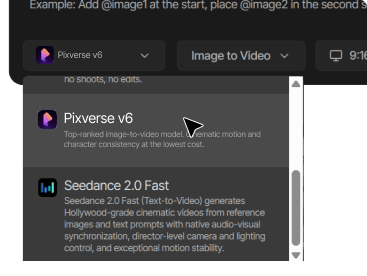
Open Tagshop AI
Vai su tagshop.ai → Generatore di risorse → Scegli modello. Seleziona PixVerse V6 dall'elenco dei modelli.
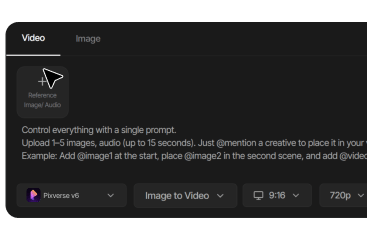
Scrivi il tuo prompt
Includi la direzione specifica della telecamera (indica il tipo di movimento: carrello, gru, carrellata, soggettiva, fisheye), la descrizione della scena e qualsiasi dialogo o segnale audio.
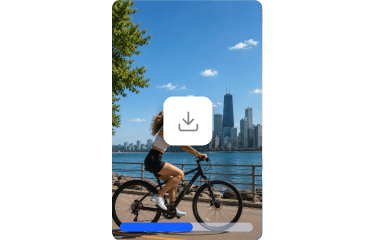
Genera ed esporta
Generazione in 10-15 minuti. L'audio viene generato automaticamente insieme al video. Scarica senza watermark con licenza commerciale completa.
Cosa puoi creare con PixVerse V6
Dalla selezione di modelli basata su dati concreti ai filmati aziendali di qualità cinematografica, PixVerse V6 gestisce ogni formato di alto valore.

Selezione del modello basata sull'evidenza
Per i team che devono giustificare le decisioni relative agli strumenti creativi con dati, e non con opinioni, la classifica ELO indipendente di PixVerse V6 fornisce una prova di qualità inoppugnabile.

Test ad alto volume economicamente vantaggiosi
Prestazioni di riferimento di prim'ordine a un basso costo al minuto rendono i test creativi su larga scala finanziariamente sostenibili senza compromettere la qualità del risultato.

Film cinematografici aziendali
Oltre 20 controlli della telecamera e la narrazione multi-inquadratura offrono una qualità di produzione da regista a partire da un singolo comando.

Dialogo e contenuti del relatore
La generazione audio nativa rende PixVerse V6 pronto per annunci con testimonial in stile UGC e dimostrazioni di prodotti senza necessità di post-produzione audio.

Campagne globali multilingue
La visualizzazione del testo all'interno del frame in più lingue supporta campagne localizzate senza la necessità di un lavoro di progettazione separato per ogni mercato.

Portfolio di lavori dell'agenzia
La classifica di qualità, verificata in modo indipendente, offre alle agenzie una risposta credibile e basata su parametri di riferimento quando i clienti chiedono il perché di questo modello.
PixVerse V6 contro altri modelli video basati sull'IA su Tagshop AI
Come si confronta PixVerse V6 con Veo 3.1, Kling 3.0 Omni e Sora 2? Scegli il modello giusto per le tue esigenze creative.
 PixVerse V6
  Vedo 3.1
  Kling 3.0 Omni
  Sora 2
 Altri modelli di intelligenza artificiale su Tagshop AI
Tutti i modelli video di intelligenza artificiale più all'avanguardia in un'unica piattaforma, e passa da un modello all'altro in qualsiasi momento.
Ne vedo 3
Il modello di intelligenza artificiale cinematografica di Google DeepMind. Dialoghi nativi, audio cristallino, qualità visiva eccellente.
Blade AI 3.0
Voce narrante AI coerente con il personaggio e con una sincronizzazione labiale precisa, ideale per annunci video UGC ad alto tasso di conversione.
Seedance 2.0
Annunci e-commerce multi-inquadratura con audio nativo e movimento regolabile, dall'immagine del prodotto al video rifinito.


Cosa dicono i brand di PixVerse V6 su Tagshop AI



Il video che hai creato per noi ha davvero superato le nostre aspettative: è fantastico!
"Ogni inquadratura non solo era accattivante, ma anche realizzata con grande cura, a dimostrazione dell'elevato livello di creatività e dell'impegno profuso nella sua produzione. Abbiamo raggiunto un CTR superiore al 2% e, con un costo per clic di soli 0,20 dollari, l'efficacia del vostro lavoro è innegabile."
Esma E.
Marketing degli influencer


Strumento integrato per la generazione di video e immagini UGC (contenuti generati dagli utenti) basato sull'intelligenza artificiale.
"Lavoro nel settore della sicurezza delle API, ma sono sempre stato curioso di esplorare diversi strumenti di intelligenza artificiale per la generazione di immagini, video o contenuti creativi. I contenuti generati dagli utenti (UGC) sono ormai indispensabili per qualsiasi brand e ho provato molti strumenti di intelligenza artificiale per la creazione di video. Ciò che apprezzo di Tagshop AI è la sua semplicità. È facile da usare, non complicato e persino chi non ha esperienza con l'IA può iniziare a utilizzarlo rapidamente. Questo lo rende uno strumento di intelligenza artificiale per la creazione di video UGC estremamente intuitivo."
Sivan Michaeli-Roimi
Vicepresidente Marketing @Pynt | Fondatore di Heyou.io


Il miglior generatore di video per immagini di prodotti che tengono in mano, per me.
"Ho usato Tagshop AI due giorni fa. Ho creato un video di un prodotto UGC generato dall'IA con questo strumento. L'ho trovato davvero facile da usare, senza funzionalità complesse. Hanno un loro modello di generazione immagini, in cui puoi prima generare un'immagine del prodotto o caricarne una, e poi puoi creare anche un video per lo stesso prodotto. Mi piace questa idea, è davvero interessante, ma vediamo come posso passare al loro piano."
Alon Michaeli
Responsabile dell'IA per la generazione di ricavi presso DealHub


L'avatar sembra realistico. Utile per generare video UGC di alta qualità basati sull'intelligenza artificiale.
"Utilizzo Tagshop AI come strumento di generazione video UGC basato sull'intelligenza artificiale da un mese e mi trovo benissimo. Apprezzo molto la varietà di avatar nella loro libreria. La parte migliore di questo strumento è l'editor: semplice, pulito e facile da usare. Ora non ho più bisogno di cambiare scheda per modificare il video."
Yuliia Kolomiiets
Vicepresidente del marketing


Le funzionalità multilingue di questo strumento sono davvero straordinarie.
"Poiché il mio pubblico di riferimento proviene da Stati Uniti, Germania e Italia, la funzionalità multilingue è molto utile in questo caso. Posso creare video avatar in diverse lingue. Questo è un vantaggio quando ci si rivolge a un pubblico ampio."
Anirudh
Responsabile del marketing digitale


Strumento che fa risparmiare tempo e ha un prezzo accessibile.
"Lo strumento è velocissimo nella creazione di video UGC generati dall'IA. Apprezzo l'editor integrato, perché non è necessario passare a un'altra scheda."
Stephen Mathew
Responsabile marketing


Creare influencer basati sull'IA diventa facile con Tagshop AI
"Grazie a Tagshop AI, ho creato una serie di video con avatar basati sull'intelligenza artificiale che ora vengono utilizzati dai miei clienti. Sono felice di aver trovato il modo più veloce per creare avatar con l'IA. Lo strumento è rapido e facile da usare. È davvero intuitivo, anche per i principianti, persino chi non ha familiarità con l'IA può utilizzarlo senza problemi."
Kazi Mainuddin
Specialista di marketing dei contenuti


Grazie all'utilizzo dell'intelligenza artificiale di Tagshop, siamo riusciti a ridurre significativamente i tempi di ripresa.
"Tagshop AI ci ha aiutato a ridurre drasticamente i tempi di scatto dei nostri prodotti. La funzione Digital Twin / AI Twin ci permette di creare immagini di prodotto di alta qualità senza dover allestire ogni volta luci, telecamere o sfondi. Ci basta caricare alcune immagini e lo strumento genera risultati di alta qualità, pronti per annunci pubblicitari o social media. Per un piccolo team marketing come il nostro, questo significa risparmiare ore ogni settimana e semplificare notevolmente la creazione di contenuti."
Arpan Shah
Consigliere delegato


La dashboard di Tagshop AI è organizzata molto bene, anche per chi come me è alle prime armi con la creazione di video.
"Tagshop AI ha reso molto più semplice tutta la creazione dei video, soprattutto per chi come me non ha un background solido nel montaggio. La dashboard è pulita e molto ben organizzata, il che mi ha aiutato a capire rapidamente il flusso di lavoro. Mi è piaciuto davvero quanto sia semplice generare contenuti, modificare i video e navigare tra le diverse funzionalità senza sentirsi confusi. La piattaforma fa risparmiare tempo e rende l'intero processo fluido ed efficiente. Nel complesso, è uno strumento adatto ai principianti che offre risultati dall'aspetto professionale con il minimo sforzo."
Aygul M.
Strategist di PR digitale


Per noi, Tagshop AI è il modo più veloce per creare video ad in stile UGC ad alta conversione
"Tagshop AI ci sta attualmente aiutando a produrre video ad in stile UGC rapidamente. Caricare il link di un prodotto e lasciare che l'IA generi automaticamente script, avatar e video completi ci fa risparmiare un'incredibile quantità di tempo. Gli avatar realistici e la clonazione vocale risultano naturali, e le funzionalità multilingue rendono semplici le campagne internazionali per noi. Attualmente produciamo oltre 90 video al giorno con varianti per i test A/B senza alcuna ripresa, creator o montaggio."
Arina K.
Direttrice marketing


I video ad in stile UGC diventano semplici grazie al flusso di lavoro dell'agente video IA.
"Quindi, con il tempo abbiamo anche sviluppato l'approccio per generare video UGC con l'IA per le nostre piattaforme pubblicitarie. Abbiamo esplorato di recente la nuova funzionalità di generazione video tramite l'agente video IA, e questo smart ai agent genera per noi script, elementi visivi e video nel giro di pochi minuti. Quindi sì, possiamo dire che stiamo risparmiando molto tempo di produzione video, e la generazione dei video avviene semplicemente chattando con l'agente. Quindi, penso che stiamo già eliminando molti dei processi tipici grazie all'agente."
Bhavik B.
Co-fondatore
Domande frequenti su PixVerse V6
Tutto quello che devi sapere su PixVerse V6 su Tagshop AI.
Cos'è PixVerse V6?
PixVerse V6 è davvero il modello video con la valutazione più alta?
Quanto costa PixVerse V6 rispetto ad altri modelli di punta?
PixVerse V6 genera audio?
Quali controlli della fotocamera supporta PixVerse V6?
Qual è la durata dei video che PixVerse V6 può produrre?
In cosa si differenzia PixVerse V6 da PixVerse V5?
PixVerse V6 supporta più lingue?
Posso utilizzare PixVerse V6 per la pubblicità commerciale?

Il modello video basato sull'intelligenza artificiale con il punteggio più alto, testato in modo indipendente. Audio nativo. Oltre 20 controlli per la fotocamera.