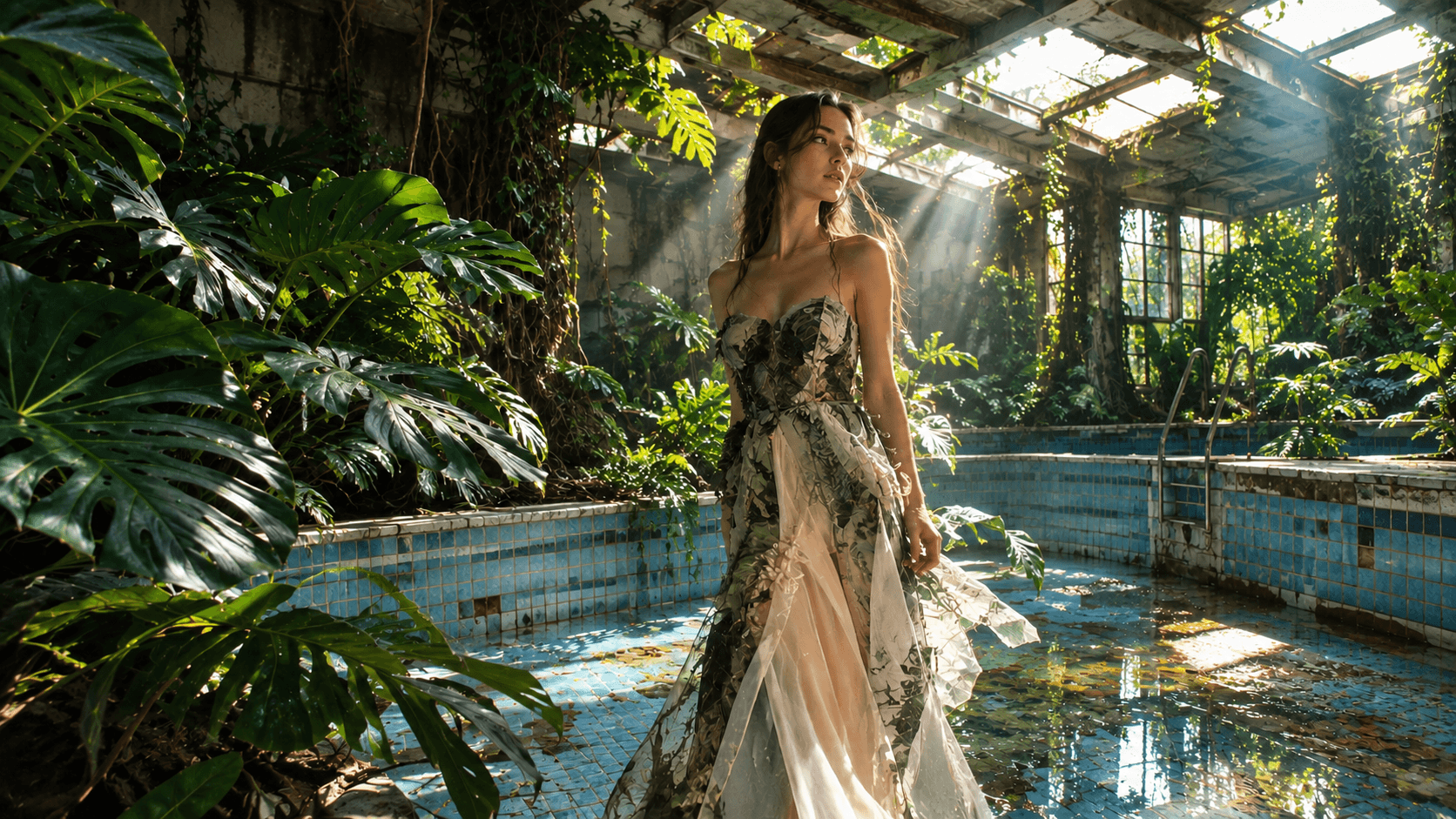
Gpt Image 2.5 AI Image Generator
Gpt Image 2.5 is OpenAI's most advanced image generation model - available on Tagshop AI. It generates photorealistic images, product shots, interface mockups, editorial illustrations, and brand visuals up to 3840px from a text prompt or existing image, in two variants: Flare for speed and Sunburst for maximum detail.
What Is Gpt Image 2.5?
Gpt Image 2.5 is OpenAI's second-generation image synthesis model, released in 2026. It succeeds GPT Image 2 with two distinct variants - Flare and Sunburst - each tuned for a different balance of speed and quality. Both variants generate images from text prompts and edit existing images, at resolutions up to 3840px.
The model introduces several capabilities absent from earlier OpenAI image models: native text rendering that keeps words legible inside generated images, multi-turn editing that carries changes across sequential instructions without losing earlier context, and automatic subject masking that produces clean cutouts directly from the API. Released shortly after GPT-5 Astra, it also integrates with Astra's conversational interface - allowing image generation inside extended AI conversations without switching tools.
On Tagshop AI, Gpt Image 2.5 is available as a selectable model for image generation. Choose between Flare (standard-quality outputs at approximately half the latency of GPT Image 2) or Sunburst (extended processing for maximum texture and detail retention). Use it to generate product images, creative concepts, editorial visuals, interface mockups, and brand assets - with or without a reference image to edit.
GPT Image 2.5: Technical Specifications
Exact parameters for GPT Image 2.5 on Tagshop AI
Model developer
OpenAI
Model type
AI Image Generator, precision editing and multi-turn consistency
API models
GPT-Image-2.5 Flare (speed) · GPT-Image-2.5 Sunburst (precision)
Input types
Text prompt · Image reference
Output resolution
3840 x 3840 native
Generation latency
Up to 50% lower than GPT Image 2 (Flare)
Text rendering languages
40+ languages including CJK, Arabic, calligraphic scripts

Transparent background
Native support, improved complex-layout handling
Aspect ratios
1:1 · 4:5 · 16:9 · 9:16
Output format
JPG · PNG · WebP · PNG with alpha
Style range
Photorealistic · Illustrative · Graphic · Editorial · Abstract
Provenance
C2PA metadata and invisible watermarking at the source (OpenAI)
Commercial license
Full commercial use on all paid plans
Why Brands Choose Gpt Image 2.5
Four capabilities that make Gpt Image 2.5 the most precise image model on Tagshop AI
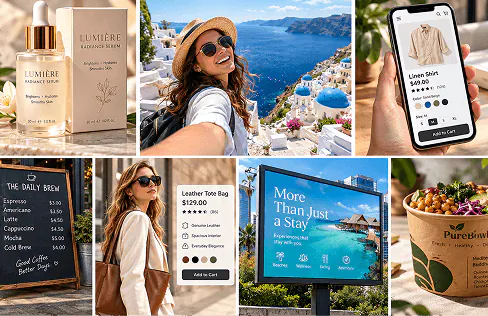
Text Inside Images - Finally Readable
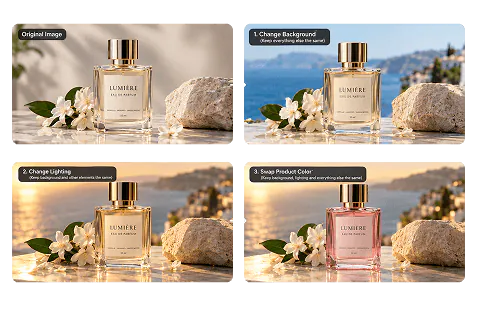
Edit One Thing. Leave Everything Else.
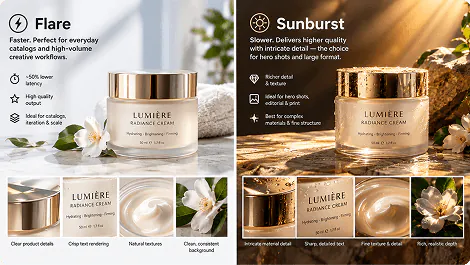
Flare for Volume. Sunburst for Hero Shots.
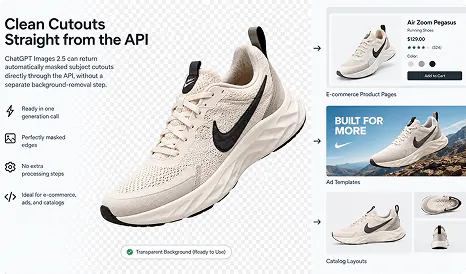
Clean Cutouts Straight from the API
Flare vs Sunburst - Which Variant to Use
The core decision every Gpt Image 2.5 user faces on Tagshop AI
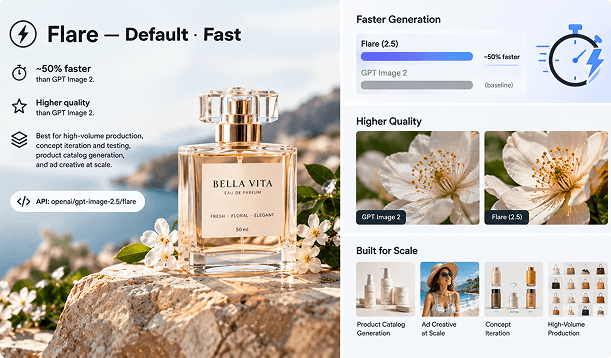
Flare - Default · Fast
~50% faster than GPT Image 2. Higher quality than GPT Image 2. Best for high-volume production, concept iteration and testing, product catalog generation, and ad creative at scale. API: openai/gpt-image-2.5/flare
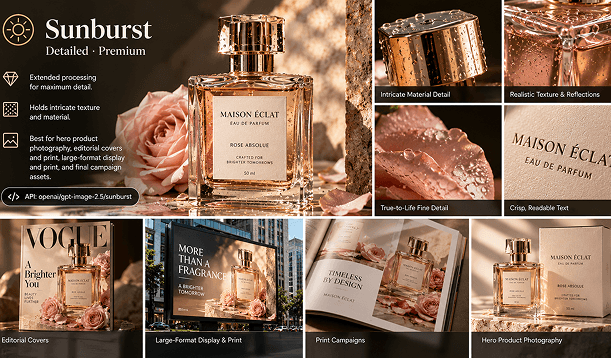
Sunburst - Detailed · Premium
Extended processing for maximum detail. Holds intricate texture and material. Best for hero product photography, editorial covers and print, large-format display and print, and final campaign assets. API: openai/gpt-image-2.5/sunburst
Ready-to-Use Prompts for Gpt Image 2.5
Copy any prompt directly into Tagshop AI with Gpt Image 2.5 selected
Prompt: "A polished SaaS analytics dashboard, dark navy left sidebar, wordmark and legible nav items. Main area with four stat tiles (MRR, churn, active seats), a wide area chart with month labels, and a sortable account table. No browser chrome."
Prompt: "Candid studio portrait on an 85mm lens at f/2. Subject in mid-conversation, eyes toward camera, soft window light from the left. Shallow depth of field, film grain, muted colour grade."
Prompt: "A premium skincare serum bottle on a white studio surface. Even diffused lighting, no shadows, perfectly centred. The background should be transparent - return a cutout ready for placement."
Prompt: "A Swiss International Style exhibition poster. A huge uppercase grotesk headline 'MODERN FORM' spans the width. Black and white with a single red geometric accent. Flush left grid, generous margin. Print-ready, 4:3 orientation."
Prompt: "Overhead shot of a grain bowl: herbed quinoa, roasted chickpeas, sliced avocado, halved cherry tomatoes, scattered pomegranate seeds. Ceramic bowl on a raw linen surface. Warm natural light from top right, soft shadows."
Prompt: "Interior of a residential living room at golden hour. Concrete ceiling, oak floor, a three-seat linen sofa facing floor-to-ceiling west-facing glass. Warm afternoon light casting long shadows across the floor. Photorealistic, no people."
How to Create AI Images with Gpt Image 2.5 on Tagshop AI
From model selection to a 4K export
Write Your Prompt or Upload a Reference Image
Describe your idea and add a reference image - include subject, setting, lighting, composition, style, and any text that should appear inside the image. For image editing, upload your existing image first, then describe the change you want to make in the prompt field.
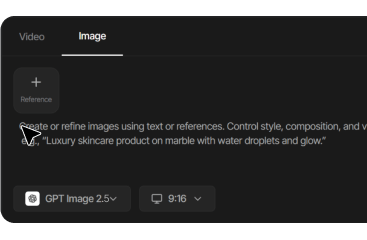
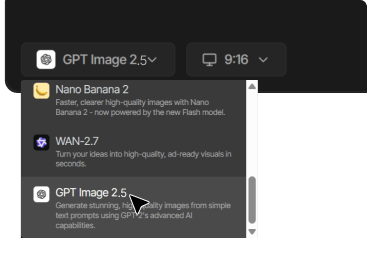
Select Gpt Image 2.5
In the model selector, choose 'Gpt Image 2.5' from the list.

Generate, Review, and Export
Gpt Image 2.5 delivers your image in seconds with maximum details. Review the output and, if needed, send a follow-up instruction to refine - change lighting, adjust a colour, swap text content, remove the background - without regenerating from scratch. Export at full resolution (up to 3840px) for immediate use in ads, product pages, or creative templates.
What You Can Create With Gpt Image 2.5
Six ways brands use Gpt Image 2.5 on Tagshop AI

E-commerce Product Photography
Generate studio-quality product images across your full catalog - packshots, lifestyle contexts, and automatic cutouts for PDPs and ad templates - without a photo studio or photographer. Flare variant for volume; Sunburst for hero images.

Interface Design and UI Mockups
Generate realistic UI mockups with actual readable content - stat tiles, nav labels, data tables, charts. Gpt Image 2.5's native text rendering makes these usable as real design reference, not placeholder lorem ipsum.

Editorial and Print Design
Generate magazine covers, exhibition posters, editorial spreads, and brand campaign visuals with typographic precision. Sunburst variant for large-format and print - holds detail at the resolutions print demands.

Brand Creative and Concept Iteration
Rapid concept generation for brand campaigns. Use Flare to generate 10 creative directions in minutes, then switch to Sunburst for the hero finalisation of the direction the client approves.

Architecture and Interior Visualisation
Generate photorealistic architectural renders and interior visualisations from text descriptions. No 3D modelling software required - describe the space, materials, light, and composition. Sunburst handles texture depth and material realism at full resolution.

Ad Creative at Scale
Generate all image assets for a Meta or TikTok campaign from a single brief session - product on white, lifestyle context, promotional graphic with readable text overlay, and cutout for composite. Flare variant at full production speed.
GPT Image 2.5 vs Other AI Image Models
How GPT Image 2.5 compares to Nano Banana Pro and Seedream 5.0
 Nano Banana Pro
  Seedream 5.0
 More AI Models on Tagshop AI
Every frontier AI image model in one platform
Seedream 5.0
2K precision images that pair with Seedance 2.0 for a matched image-to-video workflow.
GPT Image 2
4K images across every style: photorealistic, illustrative, typographic, from one model.
Nano Banana Pro
4K product photography with 94% text accuracy. For campaigns where quality is everything.
Nano Banana 2
Studio-quality product images in under 60 seconds. Built for ecommerce scale.
Flux 2 Pro
Best-in-class prompt adherence and photorealism from Black Forest Labs, across every visual style.
Ideogram 3
The only model built specifically for accurate in-image text - logos, posters, and design assets.
Hunyuan Image 3
Tencent's photorealistic model, built for authentic Asian and multicultural representation.
Grok Imagine Image
xAI's image generation model, bringing photorealistic and creative visual generation to Tagshop AI.
Explore Related Tools


Trusted by 5000+ Brands Globally



The video you created for us truly exceeded our expectations - it's fantastic!
"Every frame was not only engaging but also beautifully crafted, clearly showing the high level of creativity and effort that went into its production. We achieved CTR of over 2%, and with a cost per click of just $0.20, the effectiveness of your work is undeniable."
Esma E.
Influencer Marketing


Seamless AI UGC video and image generation tool
"I work in the API security space, but I have always been curious about exploring different AI tools whether for generating images, videos, or creative content. UGC is something every brand needs nowadays, and I have tried many AI video tools. What I like about Tagshop AI is its simplicity. It’s easy to use, not complicated, and even someone without an AI background can get started quickly. That makes it a very user-friendly AI UGC video tool."
Sivan Michaeli-Roimi
VP Marketing @Pynt | Founder of Heyou.io


Best image to Product holding video generator for me
"I used Tagshop AI 2 days ago. Create an ai ugc product holding video with the tool. I have literally found the tool easy to use, with no complex functionality inside it. They have their own image generation model, where you can first generate a product image or upload one, and then you can also create a video for the same product. I like this idea, pretty cool, but let’s see how I can move to their plan."
Alon Michaeli
Head of Revenue AI at DealHub


Avatar looks realistic. Helpful to generate high-quality ai ugc videos.
"I've been using Tagshop AI as an AI ugc video generation tool for 1 month, and it's working well for me. I love the variety of avatars in their avatar library. The best part I have got in this tool is their editor, simple and clean look, and easy to use. Now, I don't need to switch tabs to edit the video."
Yuliia Kolomiiets
VP of Marketing


Multi-lingual features in the tool are pretty amazing.
"As my targeted audience is from the USA, Germany and Italy, their multilingual feature is helpful in this situation. I can create multiple avatar videos in different languages. So this is the benefit when you are targeting a wide audience."
Anirudh
Head of Digital Marketing

Time Saving and Affordable Tool
"The tool is super quick while creating the ai ugc videos. I like the editor within the tool, you don't have to switch to another tab."
Stephen Mathew
Marketing Manager


AI influencer becomes easy to create with Tagshop AI
"With the Tagshop AI, I have created a set of AI avatar videos that are now working for my clients. I am happy that I have found the fastest way to create AI avatars. The tool is quick and easy to use. I mean beginner-friendly, even a non-ai person can also operate this."
Kazi Mainuddin
Content Marketer


We have successfully reduced our shooting time after using Tagshop AI.
"Tagshop AI has helped us cut down our product shooting time by a huge margin. The Digital Twin / AI Twin feature lets us create clean product visuals without setting up lights, cameras, or backgrounds every time. We simply upload a few images, and the tool generates high-quality results that look ready for ads or social media. For a small marketing team like ours, this saves hours every week and makes content creation much easier."
Arpan Shah
Managing Director


Tagshop AI dashboard is very well organized, even for a beginner in video creation like me.
"Tagshop AI has made the whole video creation much easier for me, especially as someone without a strong editing background. The dashboard is clean and very well organized, which helped me quickly understand the workflow. I really liked how simple it is to generate content, edit videos, and navigate different features without feeling confused. The platform saves time and makes the entire process smooth and efficient. Overall, it’s a beginner-friendly tool that delivers professional-looking results with minimal effort."
Aygul M.
Digital PR Strategist


For us, Tagshop AI is the fastest way to create high-converting ugc video ads
"Tagshop AI is currently helping us to produce UGC-style video ads quickly. Uploading a product link and letting the AI auto-generate scripts, avatars, and full videos saves an incredible amount of time. The realistic avatars and voice cloning feel natural, and the multilingual features make international campaigns easy for us. We are currently producing 90+ videos daily with variations for A/B testing without any filming, creators, or editing."
Arina K.
Chief Marketing Officer


UGC style video ads become easy through the AI video agent workflow.
"So, with the time we have also developed the approach to generate ai ugc videos for our ad platforms. We have recently explored the new feature of generating videos through the ai video agent, and the smart ai agent is generating scripts, visuals, and videos for us within a few minutes. So yes, we can say we are saving a lot of video production time, video generation, just by chatting through the agent. So, what I think we are already eliminating lots of typical process already with the agent."
Bhavik B.
Co-Founder
Frequently Asked Questions
Everything you need to know about Gpt Image 2.5 on Tagshop AI
What is Gpt Image 2.5?
What is the difference between Flare and Sunburst in Gpt Image 2.5?
What resolution does Gpt Image 2.5 output?
Can Gpt Image 2.5 render readable text inside images?
How does Gpt Image 2.5 multi-turn editing work?
Is Gpt Image 2.5 available on Tagshop AI?
Can Gpt Image 2.5 generate product cutouts automatically?
What is Gpt Image 2.5 best used for on Tagshop AI?
Do I need a subscription to use GPT Image 2.5 on Tagshop AI?

Generate up to 3840px, text that stays readable and edits that build across turns.