How to Change Product Background Online?








Ever taken a great product photo only to realize the background is making it look weird for no reason? It happens most of the time, and you must admit it. A messy room, weird shadows, or any random stuff in a frame can ruin that perfect shot. The good news is, you can easily fix it using AI. Changing a product background online is actually pretty quick and easy. In this blog, we will explain to you the step-by-step process of how to change product background online using an AI background changer tool: Tagshop AI.
What Does ‘Product Background Change’ Mean?
A product background change basically means taking a photo of your product and swapping out whatever’s behind it for something professional and eye-catching. In simple words, changing its background to something better. It’s one of the easiest ways to instantly upgrade your product photos without having to reshoot them. It could be a plain white background, a colored background, or anything that fits your brand vibe. These enhanced visuals can also be used to create engaging AI product videos for ads and social media.
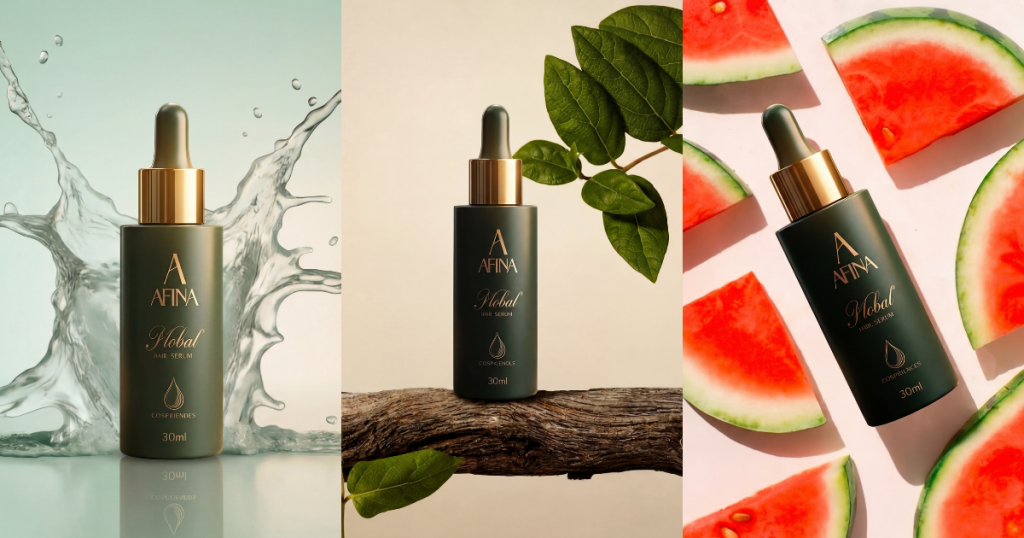
Why does it matter?
- Background can make or break how your product is perceived
- Make your product stand out
- Enhance the product image and build trust
- Make your brand look professional
Product background changes are not only about aesthetics, but they also help maintain a consistent brand identity. Hence, product background change is a small step but creates a stronger branding impact.
How to Change Product Background Online Using Tagshop AI
Here is the step-by-step guide on how to replace the product background online using Tagshop AI:
Step 1: Create an Account
- Go to Tagshop.ai and log in or create your free account.
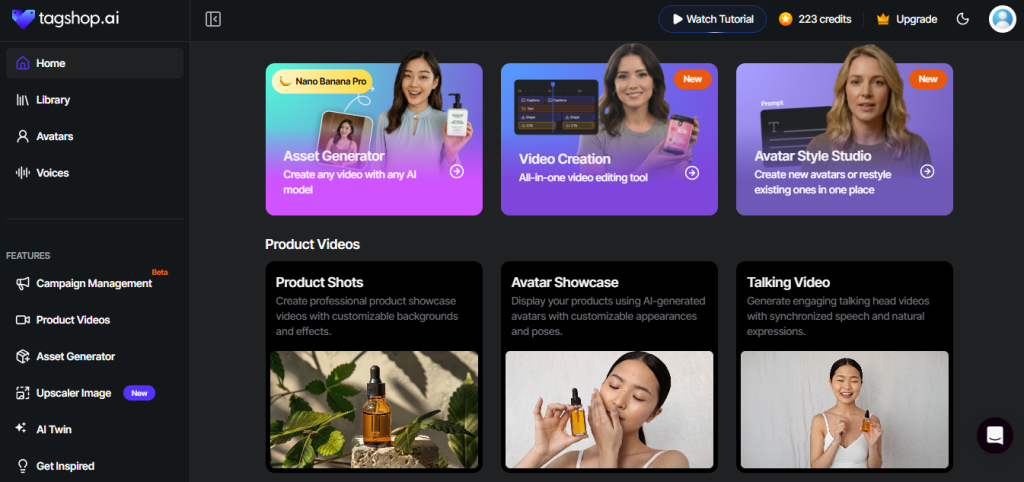
- A dashboard will appear with the following options: Avatar video, URL to video, AI twin, asset generator, video creation, and avatar style studio. You will also see certain options on the sidebar.
- From the sidebar, click on ‘Product Videos’.
- A new dashboard will appear with the following options: Talking video, avatar showcase, and product shot. Select ‘product shot’.
Step 2: Upload Your Product Image
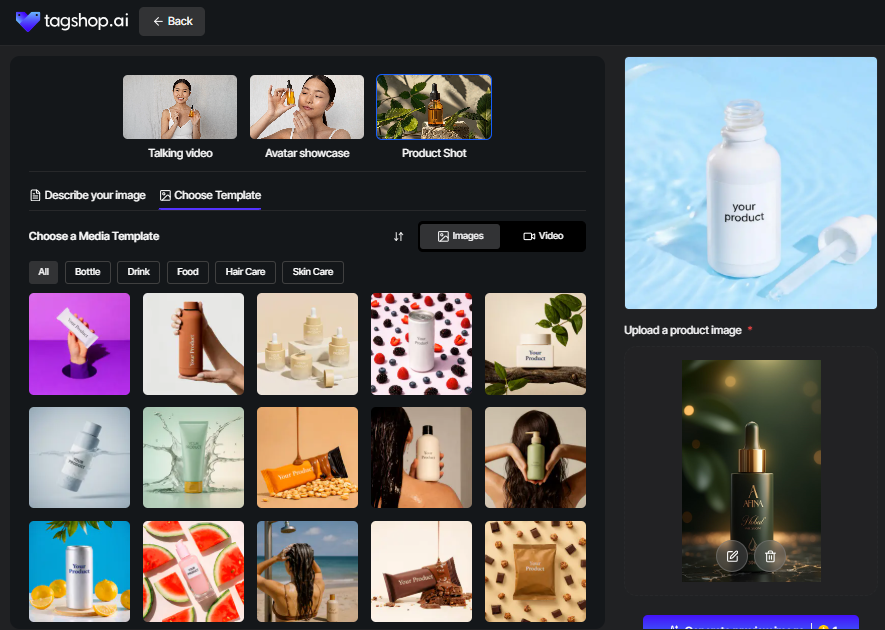
- Next, upload your product image
- Choose a media template from the available options.
- Use a tool to create a transparent background online so your product blends seamlessly into any new template or professional setting.
Step 3: Write a Prompt
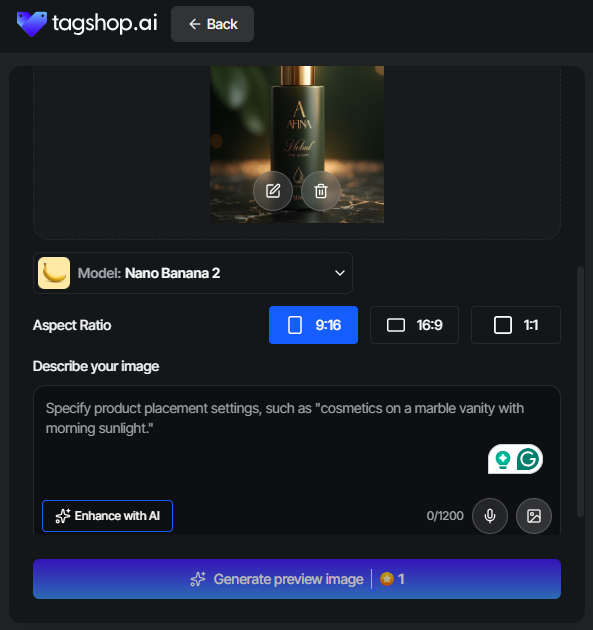
- Next to the ‘choose the template’ option, select the ‘Describe your image’ option.
- Here, select your model, choose the aspect ratio, and describe your image by giving the prompt.
- Click on ‘Generate preview image’ and in a few minutes, your product background image will be generated.
Step 4: Download Your Image or Convert into a Product Shot
- Once your image is generated, download it, or convert it into a product shot if you prefer.
This is one of the best ways to change the product background effortlessly and cost-effectively.

Benefits of Changing Product Background Online
Changing product background image online offers a number of benefits that you can look forward to:
1. Saves Time
Editing backgrounds manually can take forever if you have tons of products. With online tools like Tagshop AI, you can literally swap backgrounds in seconds. No more zooming in, erasing pixels, or dealing with messy layers. This, in turn, saves a lot of your time and manual efforts, and you can spend more time on selling stuff.
2. No Fancy Skills Needed
You don’t need to be a Photoshop expert to make your product background amazing. Most online tools like Tagshop AI are super intuitive with drag and drop functionality, simple prompt type, and that’s it. Even if you have never opened a photo editor, you can still enhance your background image professionally.
3. Makes Everything Look Professional
Changing backgrounds online lets you keep everything uniform and professional. It instantly makes your store look polished and trustworthy. You can effectively change your background and add different backgrounds, lighting, colors, and more to align it with your brand aesthetics.
4. Boosts Clicks and Sales
Do not judge a book by its cover, but honestly, people do. A messy or distracting background might hamper your image and conversions. Clean, eye-catching images grab attention, make shoppers stop scrolling, and increase the likelihood of purchase.
5. Perfect for Everything, for Ads, Marketplaces, and Social Media
Whether you are selling on Amazon, running video ads, or posting on social media, good product images are non-negotiable. Changing backgrounds online makes it easy to tailor your images for different platforms without taking new photos every time.
Best Practices on How to Change Product Background with AI
These are some of the best practices for getting that perfect AI product background:

1. Use High-Resolution Images
Always use high-resolution product images to get qualified results. This is because even the best background change can’t fix a blurry image. High-resolution images make it easier to remove the background and keep your product looking professional.
2. Keep Background Minimal
Marketplaces like Amazon or Etsy usually prefer clean and simple for maximum product visibility. A plain white or minimal background keeps the focus exactly where it should be. Too complex a background can hurt your performance and distract the shoppers.
3. Match it with Your Brand Identity
Your product background should reflect your brand identity. If your brand is minimal and modern, keep it simple. If it’s quirky, you can play with subtle colors. It is highly recommended to maintain brand consistency, as it helps your products look more recognizable.
4. A/B Test
Try testing different backgrounds for ads to see what is actually getting more clicks and conversions. A simple background might work better for one campaign, while a lifestyle background might work for others. Testing helps you stop guessing and start implementing what is performing.
Conclusion
Changing your product background might seem like a simple thing, but it can make a huge difference in how your products are seen and sold. From saving time to making your images look professional, it’s one of those simple upgrades that actually pays off. The best part? With Tagshop AI, it’s easy to get started. With the steps above and the right approach, you can effectively generate an image that grabs attention, builds trust, and more.
Frequently Asked Questions
You can use free online AI tools that remove or replace backgrounds in just a few clicks. Tools like Tagshop AI also offer easy background editing with no setup required.
The best tool is one that’s fast, accurate, and easy to use. AI tools like Tagshop are popular because they handle clean background removal and quick replacements without much effort.
Yes. You don’t need Photoshop anymore. AI tools, including Tagshop, let you change backgrounds online without any design skills.
It can, yes. Cleaner and more professional images build trust, which helps shoppers feel more confident about buying.
Simple backgrounds—like white or neutral colors—work best for most eCommerce stores and marketplaces.
Yes, and it works great for ads and social media. Tools like Tagshop AI make it easy to place products into lifestyle scenes without reshooting photos.
Pretty accurate, especially with clear images. Most AI tools do a solid job around edges and details, saving tons of manual work.
PNG works best if you need transparent backgrounds, while JPG is fine for general editing and uploads.
Yes, AI-edited images are commonly used for ads, as long as they meet the platform’s image guidelines.
Usually just a few seconds. Upload the image, choose a background or give a prompt, and you’re done.
Absolutely. Most AI tools let you create clean white background images in one click.
Yes, as long as you follow their image rules. Clean and simple backgrounds work perfectly for both platforms.
Some AI tools allow text-based prompts, making it easy to describe the background you want and generate it instantly.
If done with a good AI tool, image quality stays intact. Starting with a high-resolution image always helps.
Yes, that’s actually one of the biggest benefits. Edited images can be reused for product listings, ads, and social posts easily.
Written by:

Wagisha Adishree is an AI-driven SEO content writer who transforms data, algorithms, and marketing insights into high-impact narratives. She combines human creativity with AI-powered strategies to create content that ranks, converts, and connects. Naturally curious and sharp-witted, she enjoys exploring AI newsletters, decoding Pinterest trend signals, and drawing inspiration from football culture.
 Add Tagshop.ai as a preferred source in Google Search






 Introducing

 Wan 3.0 is now live on Tagshop AI