
Hailuo 2.3 Review: Everything You Need to Know








Judge an AI video by pausing it, and almost all of them look great. Let it move, really move: a spin, a sprint, a fight, a dance, and most fall apart. Limbs blur into the body, a face stops being a face for a few frames, and physics quietly gives up. Motion is the real test, and it’s the one most models fail.
Hailuo 2.3 is built to pass it. Its biggest strength is motion realism: movement that holds together through fast, complex action, with a character who stays the same character while they move. That focus is what sets it apart from models tuned to produce a pretty still.
Hailuo 2.3 comes from MiniMax, and it sits inside Hailuo’s end-to-end creation platform: image, video, audio, music, and editing in one place. It’s available in the Tagshop AI Asset Generator. Here’s where it’s genuinely strong, where it still needs you, and how to run it on Tagshop.
So What Exactly Makes This One About Motion?
Hailuo 2.3 is MiniMax’s latest AI video model. It generates video from text or from a starting image, and its calling card is realistic, physical motion that stays coherent even when a lot is happening on screen.
The short version of what it’s about: most video models can make a nice few seconds when not much moves. Hailuo 2.3 is tuned for the opposite: fast action, dancing, dynamic camera work, where lesser models smear and warp. It keeps the motion believable and the characters consistent throughout, which is the hard part.
It also isn’t just a model; it’s part of a full pipeline. Hailuo combines image generation, video generation, audio, music, and editing, so you can go from concept to a finished, high-resolution export without leaving the platform. That end-to-end setup is a real part of why it’s practical for actual production, not just clips.
Hailuo 2.3 at a Glance
| Spec | Hailuo 2.3 |
|---|---|
| Developer | MiniMax |
| Type | Text-to-video and image-to-video |
| Biggest strength | Motion realism through complex action |
| Consistency | Holds characters steady during movement |
| Creative control | First and Last Frame, timeline prompting, camera presets |
| Best at | Product ads, cinematic storytelling, action, dancing, anime |
| Available on | Tagshop AI |
The Features That Actually Matter
Motion That Doesn’t Fall Apart
This is the reason to use it. Hailuo 2.3 handles fast, complex movement- a dancer’s spin, a runner’s stride, a fight sequence- without the limbs melting or the body losing its shape. Where other models look best when things stay still, Hailuo looks best when things move.
Where it falls short: piling on “high speed” and “ultra fast” keywords actually hurts. It responds better to descriptive motion (“she pivots sharply and her coat flares out”) than to speed adjectives, which can lead to unnatural results.
Why it matters: motion is what separates video from a moving photo. A model that keeps movement believable is one you can use for action, dance, and dynamic ads instead of only slow, safe shots.
The Same Face, Even Mid-Spin
Plenty of models keep a face steady in a calm shot. Hailuo 2.3 keeps it steady mid-movement, when the subject is turning, running, or dancing, and most models start to drift. The person you started with is still the person three seconds in.
Where it falls short: consistency leans heavily on your starting image. A weak base image gives weaker results, so the input quality matters more here than you might expect.
Why it matters: for ads and storytelling, a character who warps the moment they move breaks the whole illusion. Holding identity through action is what makes narrative and performance video possible.
Bookend the Shot, Then Direct What Happens Between
Hailuo 2.3 gives you real structural control. Set the first frame and the last frame and it builds intentional motion between them. Go further with timeline prompting and you can direct a sequence of moments, enough to build a structured, commercial-quality ad from a single image.
Where it falls short: this control rewards planning. If you don’t think through your start, end, and beats, you’re back to leaving the pacing up to the model.
Why it matters: bookending a shot and sequencing beats is how you get video that feels directed rather than generated, which is exactly what commercial work needs.

Built-In Tools for When You Don’t Want to Write a Novel
Not everyone wants to write elaborate prompts, and Hailuo 2.3 accounts for that. Built-in camera presets handle movement without you describing it, prompt enhancement fills in the gaps, and Light Studio adds professional lighting inside the platform, no external editor required.
Where it falls short: presets and enhancement are convenient, not surgical. For a very specific look you’ll still want to prompt deliberately.
Why it matters: these tools lower the floor. You can get a polished, well-lit, nicely-moved result without being a prompt expert or opening a separate app.
One Platform, Start to Finish
Hailuo isn’t a single model bolted onto nothing. It combines image generation, video, audio, music, editing, and ready-to-use video templates, so the whole pipeline lives in one place. Templates in particular speed up common jobs like ads, social clips, and short films.
Where it falls short: an all-in-one platform is a lot of surface area, so there’s a bit more to learn than a single-purpose tool.
Why it matters: fewer tools and fewer handoffs mean faster production. Concept to high-resolution export without stitching five apps together is a real time saver.
Putting Hailuo 2.3 to Work on Tagshop AI
It runs in the Tagshop AI Asset Generator. The single most important tip: start from a strong base image. Creating a reference image first, then animating it, gives noticeably better consistency and quality than going straight from text.
Step 1. Give your Input
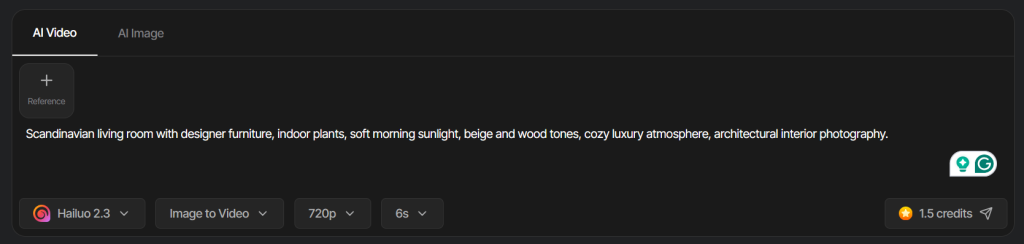
Upload a reference image or paste your prompt.
Step 2. Choose Hailuo 2.3 and prompt the motion.
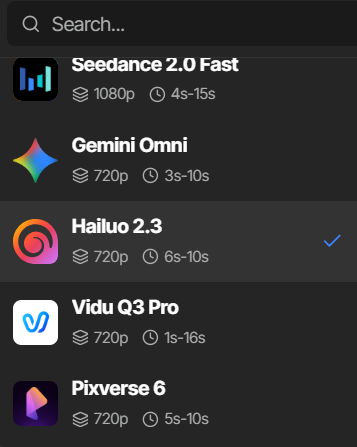
Select Hailuo 2.3, then follow the structure it likes: Subject, then Motion, then Camera, then Style. For image-to-video, don’t re-describe the scene it can already see; focus your words on how things move and how the camera behaves. Lean on descriptive motion over “high speed” keywords.
Step 3. Refine and export.
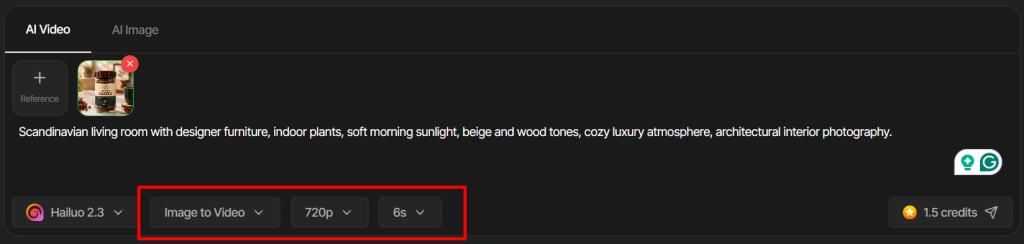
Use First and Last Frame or timeline prompting for structured shots, camera presets for movement, and Light Studio for lighting. Then export in high resolution and publish.
7 Hailuo 2.3 Prompts Worth Stealing
Written in the format Hailuo 2.3 responds to best: Subject, Motion, Camera, Style. For image-to-video, keep the scene description out and put your words into motion and camera. Swap the bracketed parts.
1. Product ad (image-to-video)
Subject: the uploaded [product]. Motion: it rotates slowly as light sweeps across its surface, then settles. Camera: a slow push-in that ends on the logo. Style: premium, cinematic, soft shadows.
2. Cinematic storytelling
Subject: a lone traveler on a ridge at dawn. Motion: they pull their coat tight and step forward as wind moves the grass. Camera: a slow tracking shot from behind, revealing the valley. Style: warm, filmic, unhurried.
3. Fast-paced action
Subject: a cyclist in a city street. Motion: they weave between cars, leaning hard into a turn, spray kicking up. Camera: a low chase shot that keeps pace. Style: gritty, high-contrast, kinetic.
4. Dancing
Subject: a dancer in a studio. Motion: a controlled spin into a sharp pose, hair and fabric following through naturally. Camera: a smooth orbit around them. Style: moody, single-source light.
5. Anime-style video
Subject: an anime hero on a rooftop at sunset. Motion: their cape billows as they turn to face the camera. Camera: a rising crane shot. Style: vibrant anime, bold linework, dramatic sky.
6. First and Last Frame
First frame: [product] in shadow. Last frame: [product] fully lit and centered with the logo. Motion: a smooth reveal between the two as light grows. Camera: gentle push-in. Style: clean, high-end.
7. Timeline ad from one image
From the uploaded product image, build a 3-beat ad. Beat 1: close detail with a slow drift. Beat 2: pull back to show it in use. Beat 3: end on the product and logo. Consistent lighting and mood throughout.
Create Videos with Hailuo 2.3Generate high-quality AI videos for ads, social media, and marketing with Hailuo 2.3 on Tagshop AI.Try Hailuo 2.3 Now
Where This Actually Earns Its Keep
Product ads. The pain is dynamic product video that doesn’t look stiff. Realistic motion plus timeline prompting turns a single product image into a moving, commercial-quality product ad.
Cinematic storytelling. The pain is AI video that can’t sustain a moment. Believable motion and First and Last Frame control let you direct short, intentional scenes with a real sense of camera.
Fast-paced action. The pain is that action is where AI video usually breaks. This is Hailuo 2.3’s home turf, sprints, chases, and fights that hold their shape.
Dance and performance. The pain is bodies that warp mid-move. Strong motion and consistency make dance and performance clips that actually look right.
Anime and stylized content. The pain is stylized motion that looks janky. Hailuo 2.3 handles anime-style movement cleanly, which is great for creators and stylized brand work.
Social creators and teams. The pain is doing the whole pipeline alone. An end-to-end platform with templates and built-in lighting means concept to export without hopping between apps, whether you’re making social videos or short films.
Hailuo 2.3 vs Seedance 2.5 vs Kling 3.0 vs Veo 3 vs Wan 2.7: The Honest Read
An honest comparison across the video models in the Tagshop Asset Generator.
| Model | Developer | Biggest Strength | Best Use | On Tagshop AI |
|---|---|---|---|---|
| Hailuo 2.3 | MiniMax | Motion realism through complex action | Action, dance, dynamic ads | Yes |
| Seedance 2.5 | ByteDance | 30-second continuous take | Long single-take ads | Yes |
| Kling 3.0 | Kuaishou | Multi-shot storytelling with audio | Sound-driven short stories | Yes |
| Veo 3 | Audio-led realism | Realistic sound-driven clips | Yes | |
| Wan 2.7 | Alibaba | Open-source control tools | Editable, controllable production | Yes |
My recommendation: if your work lives in movement, action, dance, performance, dynamic product shots, Hailuo 2.3 is the one to reach for, because motion is exactly where it’s strongest. For one long continuous take, use Seedance 2.5. For dialogue and multi-shot stories, Kling 3.0. For hands-on editing control, Wan 2.7. They all sit in the Tagshop Asset Generator, so you can pick the model that fits the shot.
The Real Pros and Cons
What’s genuinely good
- Motion realism that holds through fast, complex action.
- Character consistency maintained during movement, not just in still shots.
- Real structural control with First and Last Frame and timeline prompting.
- Built-in camera presets, prompt enhancement, and Light Studio reduce the prompting burden.
- An end-to-end platform, from image to audio to final high-resolution export.
What still needs you
- Results lean hard on your base image. A weak starting image drags everything down.
- The image-first workflow is worth it, but it’s an extra step before you get to video.
- “High speed” keywords backfire. Describe the motion instead, or outputs turn unnatural.
- The best shots take planning. First and Last Frame and timeline prompting reward thinking it through.
The Takeaway: Built for When Things Actually Move
Hailuo 2.3 is for anyone whose video depends on movement. Realistic motion through fast, complex action, characters that stay consistent while they move, and real control through First and Last Frame and timeline prompting make it the model to reach for when a still isn’t the point.
Feed it a strong base image, describe the motion rather than shouting “fast,” and plan your shots, and it rewards you. For action, dance, and dynamic ads, it’s one of the strongest options available right now.
Frequently Asked Questions
Hailuo 2.3 is MiniMax’s latest AI video model, known for realistic motion that holds together through fast, complex action while keeping characters consistent. It’s part of Hailuo’s end-to-end platform, image, video, audio, music, and editing, and it’s available on Tagshop AI.
Motion. It excels at product ads, cinematic storytelling, fast-paced action, dancing, and anime-style video, anywhere movement is central. It’s the model to choose when your shot depends on things moving convincingly rather than sitting still.
Follow the structure: Subject, Motion, Camera, Style. For image-to-video, don’t re-describe the scene it can already see; focus your words on the motion and the camera. Use descriptive motion rather than “high speed” keywords for the most natural results.
A lot. A high-quality base image dramatically improves consistency and output quality, which is why creating a reference image first and then animating it is the recommended workflow.
Yes. With timeline prompting you can build a structured, multi-beat, commercial-quality ad from one image, and First and Last Frame gives you control over how each shot opens and closes.
Use Hailuo 2.3 for motion-heavy work, action, dance, dynamic ads. Use Seedance 2.5 when you need one long, continuous 30-second take. Both are in the Tagshop AI Asset Generator.
Hailuo 2.3 is available inside the Tagshop AI Asset Generator; see Tagshop AI pricing for current plans. Start from a strong base image, choose Hailuo 2.3, prompt the motion, and export in high resolution.
Written by:

Neeraj is passionate about reshaping brand storytelling through AI-powered UGC videos. As the Founder he helps brands unlock authentic, creator-style video content that drives results - without the traditional time, cost, or complexity. His approach blends AI innovation with marketing performance to scale engagement efficiently.
 Add Tagshop.ai as a preferred source in Google Search








 Introducing

 Wan 3.0 is now live on Tagshop AI
