
Happy Horse 1.1 Review: Everything You Need to Know








Most AI video is born silent.
The sound comes later, bolted on in an editor, which is why the lip-sync so often drifts and the footsteps land half a second late. Happy Horse 1.1 generates the picture and the audio in the same pass, so a character’s mouth matches the words, and the timing holds without you fixing it after.
Alibaba released it around June 2026, and it runs inside the Tagshop AI’s Asset Generator. This review covers what that joint approach actually buys you, and where the model’s limits bite.
What is Happy Horse 1.1?
Happy Horse 1.1 is Alibaba’s AI video generation model, the follow-up to Happy Horse 1.0. It makes video from text, from an image, or from a set of reference images, and some platforms also expose a video-editing variant from the same family.
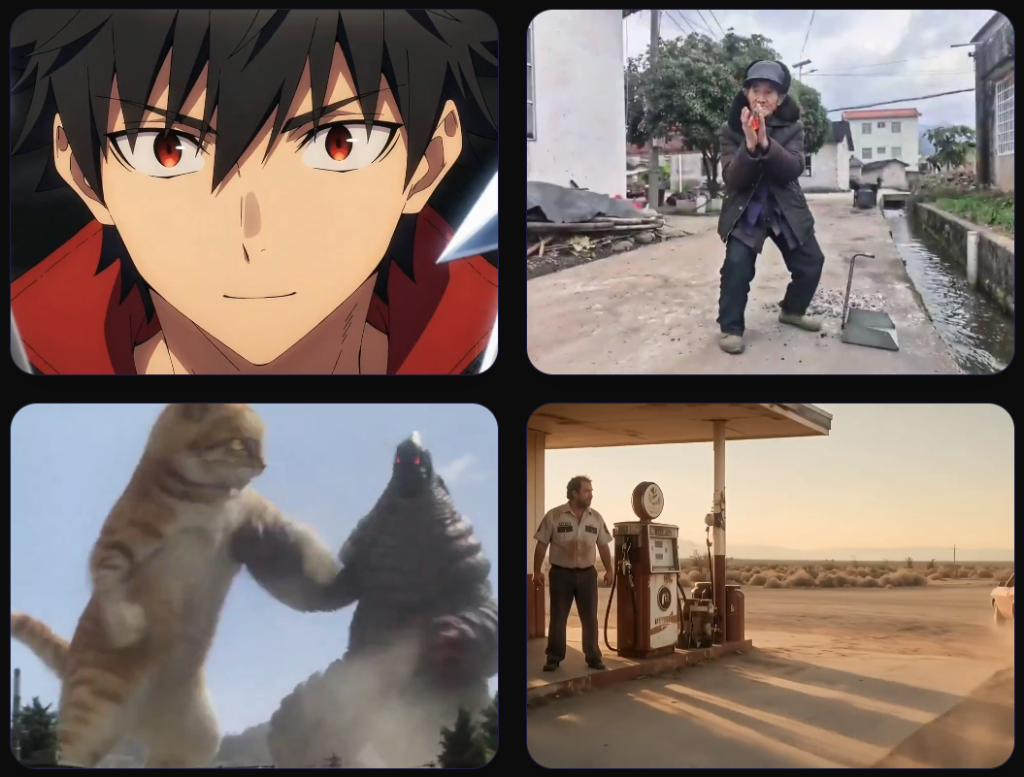
Its focus is narrow on purpose. Where a model like Seedance chases long-form generation and big production workflows, Happy Horse aims at short, production-ready clips with synchronized sound and strong subject consistency. Think commercials, short dramas, product ads, and cinematic social video, not a ten-minute film. It sits in the AI video generator lineup on Tagshop AI alongside the models built for those longer jobs.
Happy Horse 1.1 at a Glance
| Happy Horse 1.1 | |
| Developer | Alibaba |
| Released | Around June 2026 |
| Type | AI video generation |
| Modes | Text-to-video, image-to-video, reference-to-video, some video editing |
| Audio | Native, generated jointly with the video |
| Reference images | 1 for image-to-video, 2 to 9 for reference-to-video |
| Resolution | 720p and 1080p, no 4K |
| Clip length | 3 to 15 seconds |
| Aspect ratios | 16:9, 9:16, 1:1, 4:3, 3:4 |
| License | Closed, proprietary |
| API | Yes, via Alibaba Cloud (DashScope) and aggregators |
| Available on | Tagshop AI |
What Happy Horse 1.1 does well
Sound and Picture, Generated Together
This is the reason to use it. Happy Horse generates dialogue, ambience, and effects inside the same pass as the video, not as a track added afterwards. Because the visuals and the sound are produced together, lip-sync and timing tend to line up on their own, which is exactly where the add-audio-later approach falls apart.
Early users singled this out as the standout feature, since it removes a chunk of post-production for short clips. The one thing to keep in mind: it is built for short-form sound, so treat it as audio for a spot, not a full mix for a film. For talking, lip-synced characters specifically, it pairs naturally with atalking-head workflow.
Up to Nine References to Keep Things Consistent
For reference-to-video, you can feed it two to nine images, and those references hold characters, objects, and scenes steady through the clip. Nine is a practical number that covers most product and character work, though it is well short of the fifty-odd references a model like Seedance 2.5 targets for larger creative contexts. If your project needs a big reference library, that is a real ceiling; if it needs a handful of consistent assets, nine is plenty.
Smoother Motion, Especially in Fast Scenes
Alibaba put work into action, camera movement, and animation smoothness over version 1.0, and it shows most in fast-moving shots. Community testing broadly agrees the motion feels more fluid than the previous release. It is not solved everywhere: very busy scenes with many characters and overlapping movement can still throw artefacts, which is a limit most current video models share.
Characters that Stay the Same Person
Character consistency is a clear step up. Faces, clothing, and overall appearance hold more reliably across a short clip, and the effect is strongest in image-to-video and reference-to-video, where the model has something concrete to anchor to. Push a crowded, multi-character scene, and consistency can wobble, but for a single subject or a small cast it stays believable.
Sharper Detail and Better Instruction Following
Two smaller upgrades round it out. Lighting, textures, and close-up detail are cleaner than 1.0, a refinement rather than a rebuild of image quality. And prompt following improved for descriptions with several actions in sequence, so a structured prompt with a few beats in order comes out closer to what you wrote.
How to use Happy Horse 1.1 on Tagshop AI
Step 1: Start from an image or a set of references.
Paste your product URL or upload assets. For the most consistent results, give it a strong starting frame or two to nine reference images.
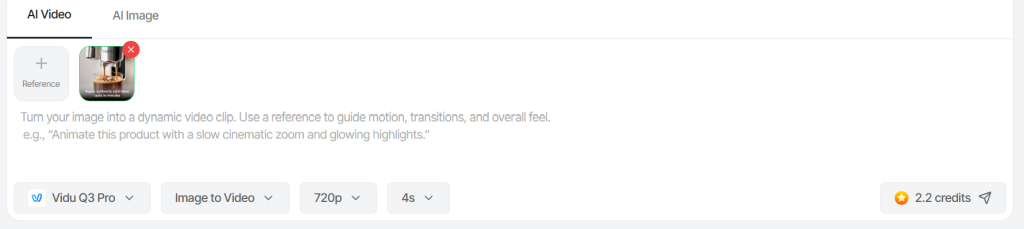
Step 2: Choose Happy Horse 1.1
Select it, then describe the action, the camera, and the audio you want, dialogue lines, ambience, or effects, since it generates sound too.

Step 3: Generate, Review and Export
Watch the clip with its sound, adjust it, and export for a product video or social. Longer stories can be built by generating clips and stitching them.
Happy Horse 1.1 Prompts that Work
Describe the sound as deliberately as the picture, since it generates both. Swap the brackets.
Try Happy Horse with Tagshop AI
Dialogue Scene with Lip-sync
A close-up of [character] in [setting] saying “[line of dialogue]”. Natural expression and lip movement matching the words, soft key light, quiet room ambience under the voice.
Product ad with sound
A 10-second ad for [product]. Open on the product on a clean set, then a person picking it up and using it. Warm lighting, upbeat ambient music, a light click sound as they open it. On-screen text: “[copy]”.
Reference-to-video for a consistent character
Using the uploaded references, generate [character] doing [action] in [location]. Keep their face and clothing identical to the references. Include footsteps and environmental sound.
Image-to-video with motion
Animate this image: [describe the motion and camera move], five seconds, natural sound to match. Keep the subject identical to the still.
Short dramatic beat
[Character] reacts to [event]: expression shifts from [emotion] to [emotion] over three seconds. Subtle score building underneath, close framing.
Who Happy Horse 1.1 is For?
It fits people making short, polished clips where sound is part of the point. For product videos and social ads, the joint audio and strong character consistency get a spot most of the way to finished in one generation. For short dramas and cinematic social content, the improved motion and in-clip dialogue mean a scene arrives with its sound already timed. Creators who make a high volume of short pieces get the most out of it, since the saved post-production time compounds.
It is a weaker fit if you need long-form video, a large reference library, heavy multi-character scenes, or 4K delivery. For those, a longer-context or higher-resolution model is the better call, and since Happy Horse is part of Alibaba’s lineup, Wan is the sibling worth checking for different strengths.
Experience Happy Horse 1.1 in Tagshop AI
Happy Horse 1.1 vs Seedance 2.5, Kling 3.0, and Veo 3.1
They aim at different jobs. Here is the honest split.
| Model | Developer | Standout | Native audio | References/length | Best pick when | On Tagshop AI |
| Happy Horse 1.1 | Alibaba | Joint audio and video, short cinematic clips | Yes | Up to 9 / 15s | You want short, sound, on-brand clips | Yes |
| Seedance 2.5 | ByteDance | Long-form and large creative contexts | Yes | ~50 / long | You need length and many references | Yes |
| Kling 3.0 | Kuaishou | Shot-by-shot cinematic control | Yes | Fewer / short | You want to direct each shot | Yes |
| Veo 3.1 | High-end commercial quality | Yes | Fewer / short | You need premium polish | Yes |
The short version: choose Happy Horse 1.1 when the job is a short, cinematic clip that needs to come out with its sound already synced. Choose Seedance for length and big reference sets, Kling for tight per-shot control, and Veo for top-end commercial finish. All four are in the Asset Generator, so you can run the same brief through each. Worth noting: Happy Horse has ranked near the top of the Artificial Analysis Video Arena for both text-to-video and image-to-video, which is part of why it caught on quickly.
Where Happy Horse 1.1 Falls Short
Know these before you commit:
- Clips cap at about 15 seconds. Longer stories mean generating several clips and stitching them together.
- References top out at nine. Fine for most work, but well below models built for large reference libraries.
- Busy scenes still break. Many characters and overlapping motion can produce temporal inconsistencies.
- Fewer production tools. It emphasizes generation quality over workflow, so timeline editing and in-video localized edits that some platforms are adding are not here.
- No 4K. It tops out at 1080p, which may fall short for high-end commercial delivery.
None of these hurt much for short product and social video. They matter if you need length, scale, or 4K.
The bottom line
Happy Horse 1.1 is the video model to reach for when a short clip needs to come out with its sound already in place. Generating audio and picture together is a genuine advantage for lip-sync and timing, and paired with smoother motion and reliable character consistency, it makes a strong tool for product ads, social media videos, and short cinematic scenes.
It is not built for long stories, big reference libraries, crowded scenes, or 4K. But for polished short-form video with sound baked in, it is one of the most useful options going, and on Tagshop it sits beside the models that handle the longer, larger jobs it leaves alone.
Happy Horse 1.1 is available now in the Tagshop AI Asset Generator.
Frequently Asked Questions
Happy Horse 1.1 is Alibaba’s AI video generation model, released around June 2026. It makes short video from text, an image, or reference images, and it generates synchronised audio in the same pass. It is available on Tagshop AI.
Yes, and that is its main draw. It generates dialogue, ambience, and effects jointly with the video rather than adding a track afterwards, which helps lip-sync and timing line up on their own.
Between 3 and 15 seconds, depending on the platform. For longer pieces, you generate multiple clips and stitch them together.
One image for image-to-video, and two to nine for reference-to-video. Those references keep characters, objects, and scenes consistent through the clip.
They are built for different jobs. Happy Horse is stronger on short, sound-cinematic clips with tight consistency. Seedance 2.5 is stronger on long-form video and large reference sets. Both are on Tagshop.
No. It outputs 720p and 1080p, with no 4K announced, so for high-end commercial delivery, a higher-resolution model is the better choice.
On Tagshop AI, Happy Horse 1.1 is one of the models in the Asset Generator under your plan; see Tagshop AI pricing. Start from an image or references, choose Happy Horse 1.1, describe the clip and its sound, and export.
Written by:

Kashish Vaswani is a Content Strategist at Tagshop AI, specializing in AI-powered marketing, UGC advertising, and eCommerce content. She creates actionable guides, industry insights, and product-focused resources that help brands, marketers, and creators leverage AI to produce high-converting video ads and scale their content strategy with confidence.
 Add Tagshop.ai as a preferred source in Google Search






 Introducing

 Wan 3.0 is now live on Tagshop AI
