
Ideogram 3.0 Review & Complete Guide: Features, Performance & Use Cases
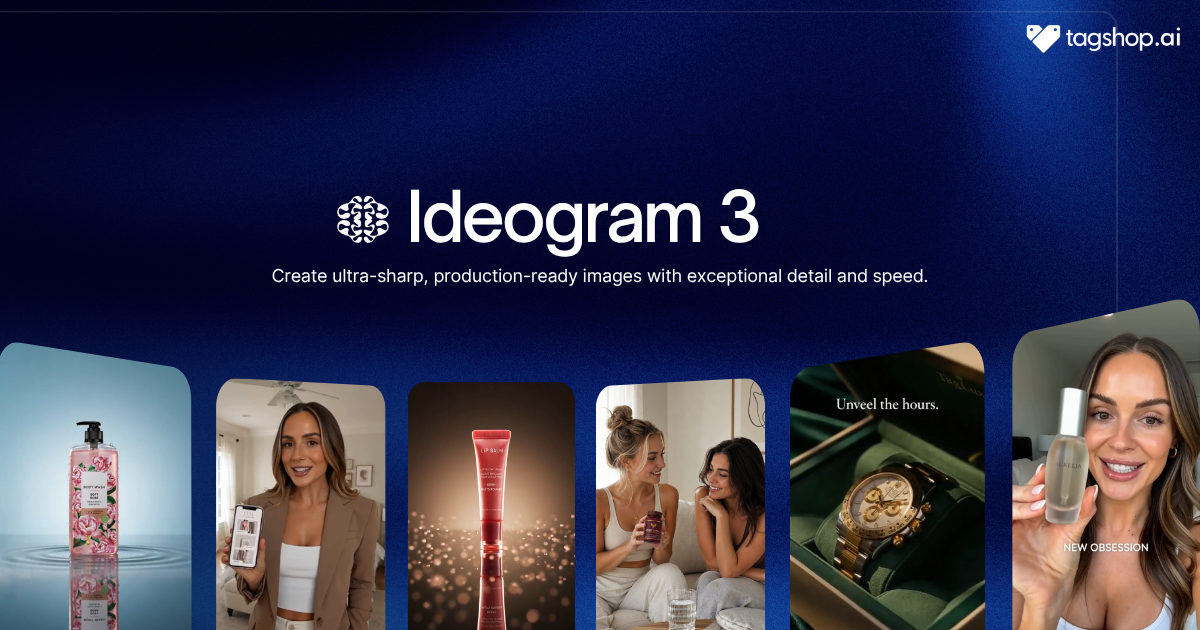







Most AI image models can’t spell.
Ask one for a poster that says “SUMMER SALE,” and you’ll often get “SUMM ER SAEL,” letters bleeding into each other, words that read like a language nobody speaks. Ideogram 3.0 was built to fix that exact problem, and it mostly does. It renders clean, readable type, which is why designers reach for it when the job is a logo, a poster, packaging, or an ad- anything where the words have to be right.

Ideogram AI released it in March 2025, and it’s less a general image model than a graphic-design tool: purpose-built for typography, branding, and layout rather than sprawling cinematic scenes. It runs inside the Tagshop AI’s Asset Generator. This review covers what it’s genuinely best at, and where a different model wins.
TL;DR: Ideogram 3.0 Review
- Ideogram 3.0 is an AI image-generation and editing model built for graphic design, especially logos, posters, packaging, advertisements, and typography-heavy visuals.
- Its biggest advantage is text rendering. It produces readable, correctly spelled text more reliably than most general-purpose image models, making it particularly useful for text-led designs.
- Ideogram 3.0 supports up to three Style References to maintain a consistent visual style across generated assets, plus Character Reference for recurring characters.
- Its editing tools include Magic Fill, Extend, and Canvas, allowing users to modify regions, expand images, and arrange designs without leaving the workflow.
- Ideogram 3.0 is best for designers, marketers, ecommerce teams, agencies, and anyone creating text-heavy brand assets.
- Compared with other AI image models, Ideogram 3.0 is the design-first choice: Nano Banana Pro is stronger for all-round commercial quality and deep editing, while Midjourney V7 is better suited to cinematic artistic scenes.
- Ideogram 3.0 has limitations: it supports only three Style References, has less editing depth than Nano Banana Pro, is weaker for complex cinematic scenes, and does not generate video.
- Bottom line: Choose Ideogram 3.0 when typography, branding, and layout are central to the image. It is one of the strongest options for logos, posters, packaging, and text-heavy marketing creatives.
What is Ideogram 3.0?
Ideogram 3.0 is an AI image-generation and editing model from Ideogram AI, released in March 2025, designed for graphic designers. It takes text and image input, produces images, and is widely regarded as one of the strongest models available for rendering readable text, frequently beating Midjourney and other general models on logos, advertisements, and packaging.
Today, we're releasing a major upgrade to Ideogram 3.0: enhanced realism, more versatile styles, improved prompt following, and greater diversity.
— Ideogram (@ideogram_ai) May 1, 2025
You can now use Magic Fill and Extend with 3.0 in Ideogram Canvas to edit both uploaded and generated images.
Ideogram 3.0 is… pic.twitter.com/QqlsF18aXN
Think of it this way: most image models are generalists that happen to handle text. Ideogram 3.0 is a specialist that happens to make images. Its design, features, strengths, and even its weaknesses point to one job: producing polished, text-accurate, on-brand design assets quickly.
Ideogram 3.0 at a Glance
| AI Model | Ideogram 3.0 |
| Developer | Ideogram AI |
| Released | March 2025 |
| Type | Image generation and editing, text and image input |
| Style references | Up to 3 images |
| Standout | Industry-leading text and typography |
| Key tools | Style References, Character Reference, Magic Fill, Extend, Canvas, Random Style |
| Access | API and web app |
| Video or audio | No |
| Available on | Tagshop AI |
What Ideogram 3.0 does better than general image models
Text that comes out spelled right
This is the whole reason to use it. Ideogram 3.0’s typography is at the front of the field: logos, headlines, packaging copy, ad text, and UI labels come out legible and correctly spelled far more often than with general models. For anything where a misspelled word means a scrapped design, that reliability is the feature.
The limit: extremely dense or elaborate typographic layouts can still slip, so proof the busy ones.
Why it matters: text is the one thing a client will always catch. A model that gets words right the first time removes the most common reason a design gets sent back.
Match a visual style from up to three references
Upload as many as three Style Reference images, and Ideogram 3.0 transfers that aesthetic, the palette, the mood, the finish, onto new generations. It’s how you keep a set of assets looking like they belong together.
The limit of three references is fewer than the eight to ten some rivals accept, so it’s built for style consistency rather than complex multi-subject compositing.
Why it matters: brand work lives on consistency. Locking a look and reproducing it across a campaign is exactly what Style References are for.
Keep the same character across a campaign
Character Reference preserves a person or character from a single image, so a brand mascot or a recurring model stays recognisable from one design to the next.
The limit: it’s identity preservation from one reference, not the deep multi-image reasoning Google’s Gemini image models do, so very complex character scenes are less reliable.
Why it matters: a consistent face is how a brand builds a recurring character without a photoshoot each time.
Edit regions and lay out on an infinite canvas
Magic Fill lets you edit a specific region while leaving the rest untouched, Extend grows an image outward, and Canvas gives you an infinite workspace to inpaint, outpaint, and arrange layouts. It’s a design surface, not just a generate button.
The limit: editing depth trails Nano Banana Pro, so for heavy, precise retouching a dedicated editing model goes further.
Why it matters: fixing and arranging in one place, without exporting to another tool, keeps a design workflow fast.
Explore styles you wouldn’t have prompted
Random Style pulls from billions of learned style presets to generate looks you wouldn’t have thought to describe. It’s a genuine ideation tool for when you’re stuck or want range.
The limit: it’s for exploration, not precision; you take the interesting accidents and refine from there.
Why it matters: the blank-page problem is real, and a button that surfaces unexpected directions is a faster start than staring at an empty prompt.
Type or paste any prompt & generate high quality images with Ideogram 3
How to use Ideogram 3.0 on Tagshop AI
Step 1. Add your references and brief
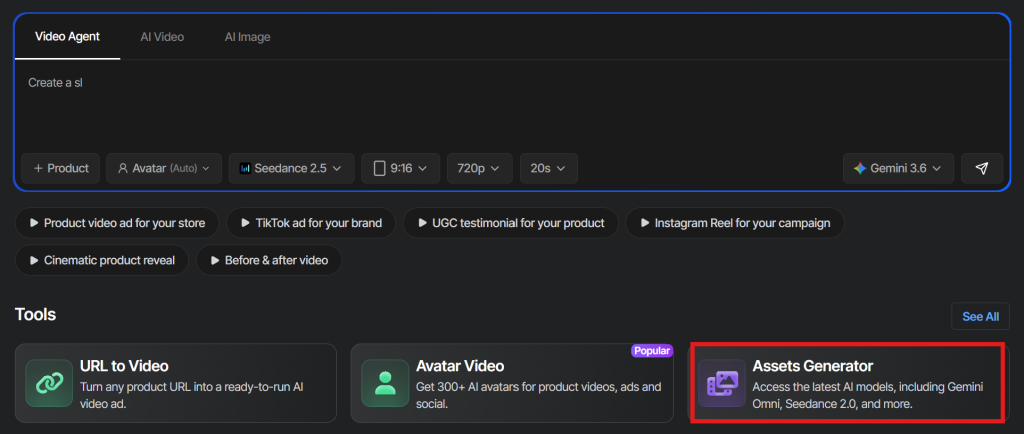
Click on Assset Generator on Tagshop AI Homepage. Upload your product, brand assets, or up to three Style References. You can also add a Character Reference when you need to keep a person or character consistent.
Step 2. Choose Ideogram 3.0 and write your prompt
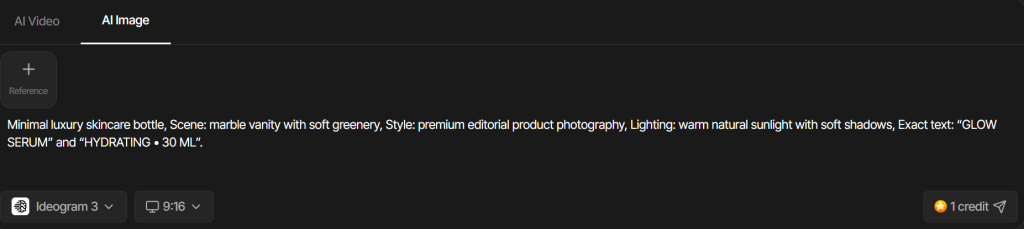
Select Ideogram 3.0, then describe the design, style, layout, and exact text you want in the image. Put important copy in quotes so the model knows exactly what to render.
Step 3. Generate, refine, and export
Generate your design, then refine it with Ideogram’s editing tools where needed. Once the result looks right, export it for your campaign, social post, packaging, or other marketing asset.
Type or paste any prompt & generate high quality images with Ideogram 3
Ideogram 3.0 Prompts that Work
Ideogram 3.0 rewards clear design direction and exact text. Put copy in quotes, name the style, and keep it specific. Swap the brackets.
Logo
A modern logo for “[brand name]”, a [industry] brand. Clean geometric wordmark, [style, e.g. minimal sans-serif], [color] on white, balanced spacing, vector-style. Text must read exactly “[brand name]”.
Poster with a headline
An event poster. Headline: “[exact headline]”. Subhead: “[exact subhead]”. Date and venue at the bottom. Bold modern layout, strong typographic hierarchy, [palette]. All text sharp and correctly spelled.
Packaging
Front-of-pack design for [product]. Brand name “[name]”, tagline “[tagline]”, and a short benefit line. Premium minimalist style, [color] palette, readable type, clean hierarchy.
Social creative with copy
A square social post for [brand]. Large headline “[copy]”, small supporting line, product image space on the right. Vibrant, on-trend, [palette]. Legible text, correct spelling.
Brand set with Style References
Using the three uploaded style references, design a [asset] for [brand] that matches their palette, mood, and finish. Keep it consistent with the reference aesthetic. Include the text “[copy]”.
Magic Fill edit
In the uploaded design, replace only the headline text with “[new copy]” in the same font and style. Leave the rest of the layout untouched.
Who Ideogram 3.0 is for
Brand and logo designers. The pain is generating usable wordmarks and typographic identities. Ideogram 3.0’s text quality makes it one of the few models you can actually prototype logos with.
Marketers. The pain is producing on-brand posters and ad creatives with correct copy, fast. Ideogram handles the text and layout without a designer in the loop for every draft.
Ecommerce. The pain is packaging concepts and social creatives with readable product copy. Ideogram gets the words right, which most models don’t.
Print and editorial. The pain is layout-heavy, text-critical design. Its typography strength and Canvas layout tools suit posters, covers, and editorial graphics.
Agencies and social teams. The pain is the volume of design across clients. Style References and Random Style speed up both consistency and ideation.
Type or paste any prompt & generate high quality images with Ideogram 3
Ideogram 3.0 vs GPT Image 2, Midjourney V7, and Nano Banana Pro
They’re strong at different jobs. Here’s the honest split.
| Model | Developer | Strongest at | Text and typography | Editing depth | Best pick when | On Tagshop AI |
| Ideogram 3.0 | Ideogram AI | Logos, posters, typography-led design | Excellent | Moderate | The design is carried by text and brand style | Yes |
| GPT Image 2 | OpenAI | Text-heavy and multilingual design | Excellent | Good | You need dense or multi-language layouts | Yes |
| Midjourney V7 | Midjourney | Cinematic, artistic scenes | Weaker | Moderate | You want the most striking artistic look | No public API |
| Nano Banana Pro | Google DeepMind | All-round commercial quality, editing | Excellent | Strong | You need top overall quality and precise edits | Yes |
How to choose: pick Ideogram 3.0 when the work is design-led- logos, posters, packaging, brand assets- where typography and style consistency matter most. Choose GPT Image 2 for dense or multilingual text layouts, and Nano Banana Pro when you want the highest all-round quality and deep editing. Midjourney V7 still leads on pure artistic scenes, but it’s a closed platform with no public API, so it isn’t part of the Tagshop AI Asset Generator like the others.
Where Ideogram 3.0 falls short
Know these before you rely on it:
- Editing depth trails Nano Banana Pro. For heavy, precise retouching, a dedicated editing model goes further.
- Multi-image reasoning is limited. It caps at three style references and doesn’t reason across many images like Google’s Gemini models.
- Complex scene composition is weaker than Midjourney V7. For elaborate cinematic scenes, it’s not the strongest choice.
- No video. It’s an image and design model only.
None of these matter for logo, poster, and brand work. They matter if you need deep edits, many-image compositing, or cinematic scenes.
The Bottom Line
Ideogram 3.0 is the model to reach for when a design lives or dies on its text. Logos, posters, packaging, and brand creatives come out with legible, correctly spelled type and a consistent style, which is exactly where most AI image models fall apart. It’s not built for cinematic scenes or deep editing, and it caps at three references. But as a fast, text-accurate design tool, it’s one of the strongest options available, and inside Tagshop AI it sits right next to the models that cover the jobs it doesn’t.
Ideogram 3.0 is available now in the Tagshop AI Asset Generator.
Frequently Asked Questions
Ideogram 3.0 is an AI image model from Ideogram AI, released in March 2025 and built for graphic design. It’s known for industry-leading text rendering, making it one of the best models for logos, posters, packaging, and marketing creatives. It’s available on Tagshop AI.
Yes, it’s one of the best AI models for logos and typography-led design. Its text rendering is accurate enough that wordmarks and headlines come out legible and correctly spelled, which most general image models struggle with.
Both are excellent at text. Ideogram 3.0 is the design-first specialist, ideal for logos, posters, and brand layouts. GPT Image 2 has the edge on very dense typography and multiple languages in one image. Both are in the Tagshop AI Asset Generator.
Up to three Style References to transfer an aesthetic, plus a Character Reference to keep a person or character consistent. That’s fewer than some rivals, but it’s tuned for style consistency rather than complex multi-image compositing.
Yes. Magic Fill edits a specific region while preserving the rest, Extend grows an image outward, and Canvas gives you an infinite workspace for layout. Its editing depth is behind Nano Banana Pro, but it covers most design refinements.
On Tagshop AI, Ideogram 3.0 is one of the models in the Asset Generator, covered by your plan, see Tagshop pricing for current details. Add your references, choose Ideogram 3.0, put your text in quotes, and generate.
Written by:

Neeraj is passionate about reshaping brand storytelling through AI-powered UGC videos. As the Founder he helps brands unlock authentic, creator-style video content that drives results - without the traditional time, cost, or complexity. His approach blends AI innovation with marketing performance to scale engagement efficiently.
 Add Tagshop.ai as a preferred source in Google Search






 Introducing

 Wan 3.0 is now live on Tagshop AI
