
20+ AI UGC Video Prompts for Every Industry (Just Copy-Paste)







A good AI UGC video starts with a good prompt. Feed the tool “make a video of this product,” and you get something generic. Give it a scene, a person, and a reason someone should care, and you get an ad worth running.
Below are 20+ copy-paste prompts, sorted by industry, that you can drop into an AI video tool and adjust in seconds. Each one is written the way you would actually type it: a product, a creator, a format, a hook, and a tone. Swap the bracketed parts for your own product and go. There is also a short formula at the top so you can write your own once you see the pattern.
TL;DR
- Vague prompts make vague ads. The fix is specificity: who, what scene, what hook, what tone.
- Use the formula: product + creator + format + hook + tone + length.
- 20+ ready-to-use prompts below, grouped by industry, all copy-paste.
- Keep any personal-experience claims honest, and disclose AI where the platform requires it.
- Paste your product, pick a prompt, review the storyboard, then generate.
The Formula for a Good AI UGC Video Prompt
Every prompt below follows the same simple structure. Once you have it, you can write prompts for anything.
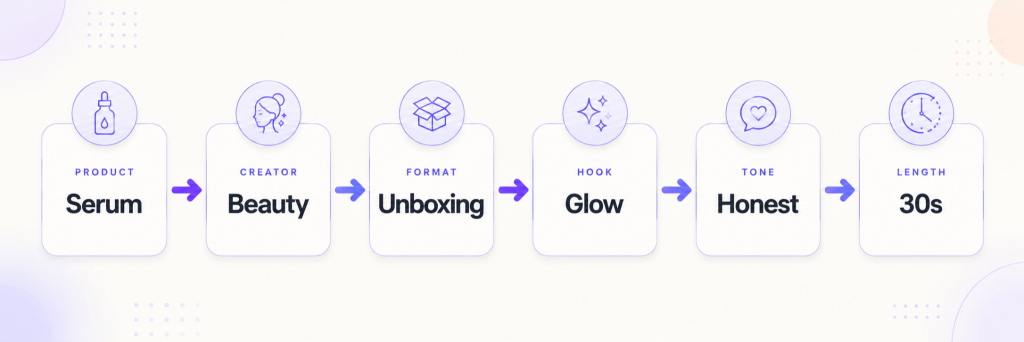
The six parts of a strong AI UGC video prompt, shown with a beauty serum example. Nail these, and the tool has everything it needs.
Every prompt below is built from these six pieces. Here is what each one means.
The six parts of a strong AI UGC video prompt
- Product: what is on screen, ideally pulled from a product URL.
- Creator: who is presenting. Age, vibe, sometimes accent.
- Format: the style. GRWM, unboxing, demo, problem-then-solution, day in the life, three reasons, POV.
- Hook: the specific first line or angle that makes someone stop scrolling. Build it on one real detail, not an adjective.
- Tone: warm, funny, calm, hyped.
- Length and ratio: usually 9:16 vertical, 15 to 30 seconds for paid social.
Miss the hook and the rest does not matter. That first line is doing most of the work.
20+ AI UGC Video Prompts by Industry
Here is the full set. Every prompt follows the formula above, so you can paste it as-is or swap any piece to fit your product. Find the one closest to what you sell, drop in your own specific detail, and you have a starting point.
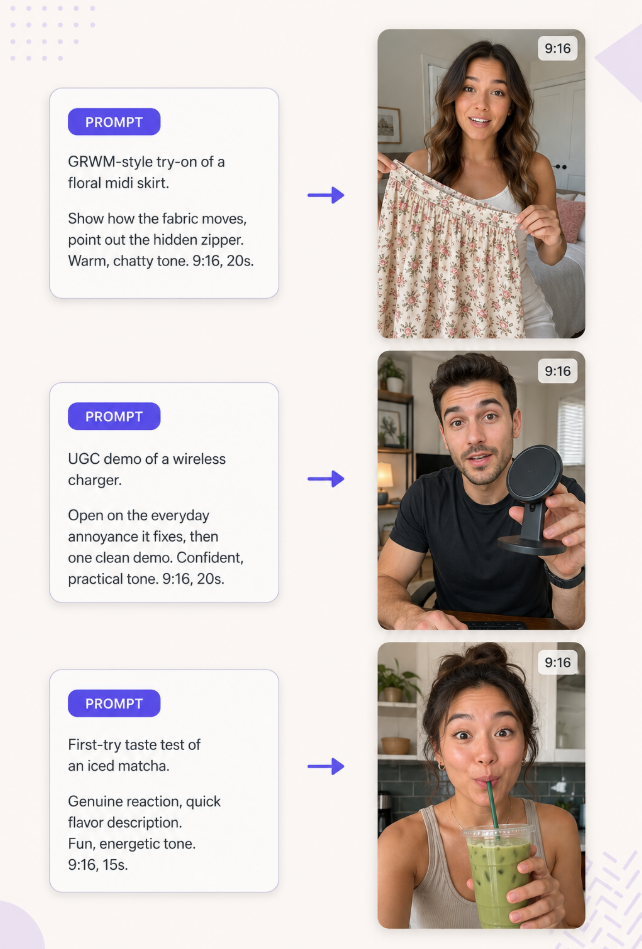
This is what that looks like once it runs. The prompt on one side, the kind of UGC video it produces on the other, across three very different products.
The prompt-to-video flow, same structure whether you are selling a skirt, a gadget, or a drink. Every prompt below works this way.
A. Fashion and apparel
1. Get-ready-with-me try-on
“Create a GRWM-style video featuring [product]. A woman in her late 20s gets ready for a summer wedding, shows how the skirt moves as she walks, and points out the hidden back zipper. Warm, chatty tone. 9:16, 20 seconds.”
2. Styling three ways
“Create a UGC video showing [product] styled three different ways for work, weekend, and a night out. Fast cuts between looks, upbeat energy, casual voiceover. 9:16, 25 seconds.”
3. Fit-check honesty
“Create a UGC try-on where a creator honestly reviews the fit of [product], mentions the true-to-size sizing and the fabric weight, and says who it flatters. Relaxed, friend-giving-advice tone. 9:16, 20 seconds.”
Beauty and skincare
4. Simple routine demo
“Create a UGC video of a creator applying [product] as part of a short morning routine, showing the texture on the back of the hand and how it absorbs. Calm, soft-spoken tone. 9:16, 20 seconds.”
5. Problem then solution
“Create a UGC video that opens on a specific skin frustration, then introduces [product] as what changed the routine. Show the pump and the finish. Honest, understated tone, no overpromising. 9:16, 25 seconds.”
6. Why-I-switched
“Create a UGC video where a creator explains why they switched to [product], focusing on one concrete reason like the fragrance-free formula. Conversational, low-key tone. 9:16, 18 seconds.”
Must Explore: AI Video Templates for Beauty & Personal Care Brands
B. Health and supplements
7. Day-in-the-life integration
“Create a UGC video showing where [product] fits into a busy morning, taken with coffee before work. Keep claims general and lifestyle-focused, not medical. Friendly, real tone. 9:16, 20 seconds.”
8. Unboxing and first impression
“Create a UGC unboxing of [product], showing the packaging, the serving size, and the taste reaction on first try. Curious, upbeat tone. 9:16, 22 seconds.”
C. Food and beverage
9. Taste-test reaction “Create a UGC video of a creator trying [product] for the first time, with a genuine reaction and a quick description of the flavor. Fun, energetic tone. 9:16, 15 seconds.”
10. Recipe or ritual
“Create a UGC video showing the little ritual of making or serving [product], slow and satisfying, with a warm voiceover about why it is the best part of the day. Cozy tone. 9:16, 20 seconds.”
D. Tech and gadgets
11. Problem it solves
“Create a UGC video that opens on the everyday annoyance [product] fixes, then shows it working in one clean demo. Confident, practical tone. 9:16, 20 seconds.”
12. Three features in 20 seconds
“Create a UGC video where a creator shows the three features of [product] they actually use, in quick cuts. No jargon, just what it does. Casual, techy tone. 9:16, 25 seconds.”
Must Read: Ready-to-Use AI Image Prompts for Effortless Image Creation
E. Home and lifestyle
13. Before and after
“Create a UGC video showing a space before and after using [product], with a satisfying reveal. Calm, aspirational tone. 9:16, 18 seconds.”
14. Restock and organize
“Create a UGC video of a creator restocking or setting up [product] at home, narrating why they love it in a relaxed voiceover. Soothing, tidy tone. 9:16, 22 seconds.”
F. Fitness and wellness
15. One clean rep or use “Create a UGC video of a creator using [product] in a short workout, showing correct form and one clear benefit. Motivating but grounded tone. 9:16, 20 seconds.”
16. Gym-bag essentials
“Create a UGC video where a creator packs their gym bag and explains why [product] made the cut. Quick, upbeat tone. 9:16, 18 seconds.”
Must Explore: AI Video Templates for Health & Fitness Brands
G. Jewelry and accessories
17. Close-up detail “Create a UGC video with close-up shots of [product] catching the light, worn and styled, with a soft voiceover about the detail that makes it special. Elegant tone. 9:16, 18 seconds.”
18. Gift angle “Create a UGC video framing [product] as a gift, showing the packaging and the reaction of receiving it. Warm, heartfelt tone. 9:16, 20 seconds.”
Must Explore: AI UGC Templates for Jewelry Brands
H. Pets
19. Pet reaction “Create a UGC video of a pet owner giving their dog [product] and capturing the reaction, with a fond, funny voiceover. Playful tone. 9:16, 15 seconds.”
20. Problem-solving for owners “Create a UGC video where an owner explains the pet problem [product] solved, shown in a quick real moment. Relatable, caring tone. 9:16, 22 seconds.”
Must Explore: AI Video Templates for Pet Brands
I. Apps and SaaS
21. Screen-share walkthrough “Create a UGC video where a creator shows their screen using [product] and narrates the one task it makes easier, like a friend showing you a shortcut. Casual, helpful tone. 9:16, 25 seconds.”
22. Before-and-after workflow “Create a UGC video contrasting the messy old way of doing a task with the [product] way, kept simple and concrete. Confident, friendly tone. 9:16, 22 seconds.”
Universal formats that work for All Industry
23. Three reasons “Create a UGC video where a creator gives three honest reasons to try [product], one per quick cut, ending on the strongest. Upbeat, sincere tone. 9:16, 25 seconds.”
24. Answering a real question “Create a UGC video that opens with a common question buyers ask about [product], then answers it clearly while showing the product. Helpful, straightforward tone. 9:16, 20 seconds.”
A Quick Note on Honesty
A few of these formats put words in a creator’s mouth about using a product. If the creator is AI-generated, keep those claims to what is demonstrable, and avoid fabricated personal testimonials like “I have used this for six months,” which run into the FTC’s rules on reviews and endorsements. Disclose AI-generated content where Meta, TikTok, or Google requires it. Honest prompts also happen to make better ads, because the specific, true detail is what earns the click.
How to Run These Prompts
The prompts do half the work. The tool does the rest. In practice the flow is short: add your product, paste a prompt, review, generate.
With Tagshop AI, you paste your product URL or upload assets, drop in one of the prompts above, and the Video Agent asks a couple of clarifying questions about your audience and talent before building an editable, scene-by-scene storyboard. You read the hook it wrote, adjust anything that feels off, choose from a range of current AI video models, and render.
Then publish to Meta or TikTok. Because you approve the storyboard first, you can tune the exact line the creator says before spending a credit, which is where a good prompt turns into a good ad. Try one prompt on your best-selling product and see how close the first draft gets.
Also Read: Ready-to-Use AI Video Prompts (All Industries Covered)
The Takeaway
Prompts are the cheapest lever you have in AI UGC. A small change to the hook or the scene can be the difference between an ad that gets scrolled and one that gets saved. Start with the prompt closest to your product, swap in one true, specific detail that makes your thing worth buying, and generate a few variations before you decide what to run. The formula matters more than any single prompt on this list, so once you see the pattern, write your own.
Frequently Asked Questions
An AI UGC video prompt is the instruction you give an AI video tool to generate a UGC-style clip. A good one specifies the product, the creator, the format, the hook, and the tone, so the tool produces something specific rather than generic.
Follow a simple structure: product, creator, format, hook, tone, and length. The most important part is the hook, the specific first line or angle built on one real detail. Vague prompts produce forgettable videos.
Yes. The prompts are written vertical (9:16) and short, which suits TikTok, Instagram Reels, and Meta ad placements. Keep your claims honest and disclose AI-generated content where the platform requires.
A few sentences is plenty. You want enough detail to define the scene, the creator, and the hook, without scripting every second. Leave room for the tool to fill in, then edit the storyboard.
Not exactly. The formats repeat across industries, so the same structure works everywhere. What changes is the specific hook and detail you plug in for your product.
Many AI UGC tools offer free tiers or trials with limited credits, which is enough to test a few of these prompts before committing to a paid plan.
Written by:

Neeraj is passionate about reshaping brand storytelling through AI-powered UGC videos. As the Founder he helps brands unlock authentic, creator-style video content that drives results - without the traditional time, cost, or complexity. His approach blends AI innovation with marketing performance to scale engagement efficiently.
 Add Tagshop.ai as a preferred source in Google Search






 Introducing

 Wan 3.0 is now live on Tagshop AI
