
How to Make AI UGC Videos with Seedance 2.5 (That Don’t Look AI)








Seedance 2.5 can now generate a full 30-second clip where a person looks into the camera and talks, mouth synced to the words, in one pass. No stitching, no separate lip-sync tool, no “close enough” mouth flaps. That one change is the reason a ByteDance video model suddenly belongs in a conversation about UGC ads.
Quick definition before we go further, because “AI UGC” means two different things to two different people. Here we mean the good version: short, native-feeling social video that reads as if a real person filmed it on their phone. Not a glossy commercial. Not an obviously fake avatar reading a teleprompter. The kind of clip that slips into a TikTok feed without anyone reaching for the skip button. That is the bar, and it is the bar Seedance 2.5 is finally tall enough to clear.
Can Seedance 2.5 actually make UGC content?
Yes. Seedance 2.5 generates talking, lip-synced video with native audio in a single pass, which is the exact thing UGC needs and most video models still fumble. It handles direct-to-camera delivery, product-in-hand moments, and casual “storytime” pacing.
It runs up to 30 seconds per clip, which is long enough for a real hook-and-payoff. The catch is that raw model output is a clip, not an ad. You still need a script, a scene order, and a way to publish, which is where a UGC workflow tool does the heavy lifting.
What’s New in Seedance 2.5
ByteDance released Seedance 2.5 in July 2026, and it is a real jump from Seedance 2.0 rather than a point update. Here are the specs that matter for creators, pulled together and cross-checked across model pages and hands-on write-ups.
| Spec | Seedance 2.5 |
| Max clip length | 30 seconds in a single pass |
| Resolution | Up to 4K, 10-bit color |
| Native audio | Yes, dialogue, sound effects, and background music generated with the video |
| Lip-sync | Phoneme-level, 8+ languages |
| Reference inputs | Up to 50 multimodal references |
| Editing | Region-level edits on generated footage |
| Input modes | Text-to-video, image-to-video, reference-to-video |
The headline for UGC people is that first row meets the third row. A 30-second unbroken take with synced dialogue means you can shoot a whole testimonial beat in one generation instead of glueing three awkward clips together and praying the cut lands.
The features that change how UGC gets made
Native audio and lip-sync in the same pass.
This is the big one. Older models gave you beautiful silent footage and left you to bolt on a voice afterwards, which is where most “AI creator” videos fall apart. The mouth never quite matches. Seedance 2.5 generates the speech, the ambient sound, and the mouth movement together, so a line like “okay I did not expect this to actually work” lands with the timing a real person would use.
Fifty reference inputs.
You can feed it your product from multiple angles, a look you want the “creator” to have, a tone reference, even an audio sample to lock a voice. For brand work, that consistency is the whole game. Your hero product looks like your hero product across ten different clips instead of morphing between generations.
Thirty seconds of runway.
UGC lives and dies on pacing. A hook at second one, the turn at second seven, the payoff before someone scrolls. Fifteen seconds forced everything to feel rushed. Thirty gives a clip room to breathe like an actual person talking.
Region-level editing.
Regenerate the background without touching the face. Swap the product in-hand without redoing the delivery. Small thing, huge time saver when a client says “love it, can the can just be blue.”
Making a real UGC ad with Seedance 2.5 in Tagshop AI
Here is the honest part. Seedance 2.5 gives you the shot. It does not give you your product wrapped around it, the edits, or the publish step, and that is the part that actually eats your afternoon. You can hunt down raw model access and juggle it clip by clip, but you will spend more time wrangling tools than making ads.
The Asset Generator closes that gap in the same three-step flow the other model walkthroughs use. You bring your product, pick Seedance 2.5 as your model, then generate, edit, and publish without leaving one screen. Here is the flow.
Step 1. Head to the Asset Generator and Paste your Product URL.
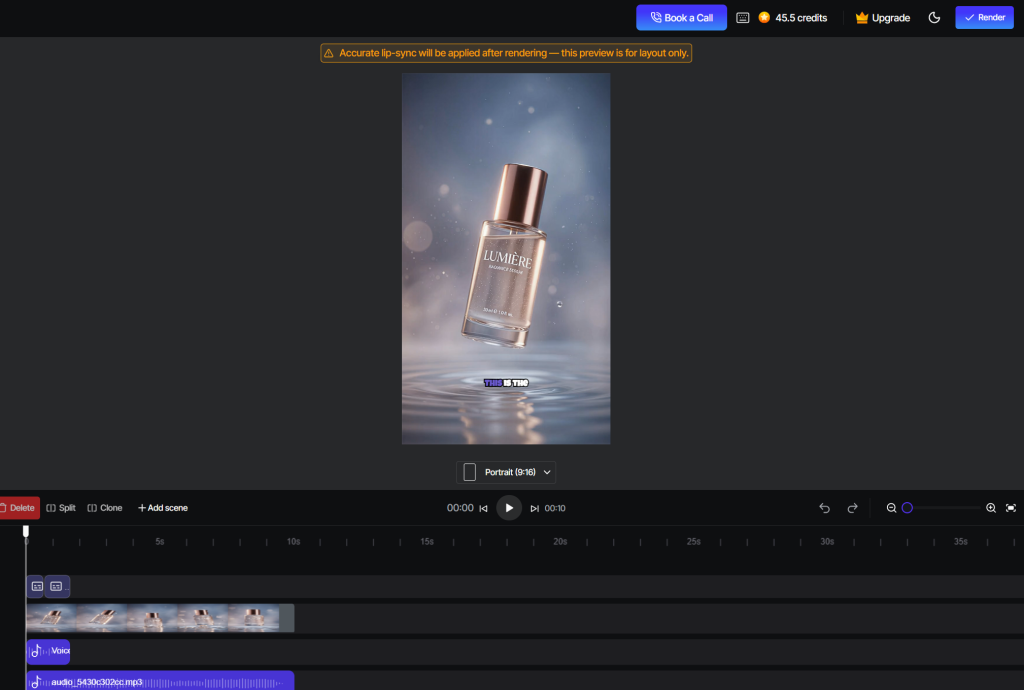
Prompt it in the simplest language but make it specific. Click Reference Images and paste your product link; it pulls your images and details automatically, or upload your own shots if you already have them.
Step 2. Choose Seedance 2.5 as your model.
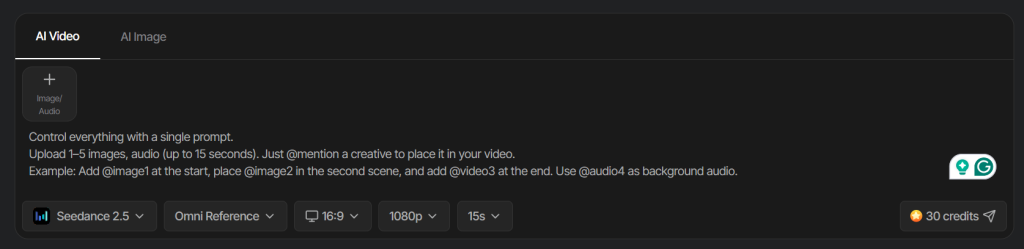
Pick it from the model list, which is where you get the native audio and lip-sync for this project instead of a silent clip you have to fix later.
Step 3. Generate and Edit.
Write your prompt, generate the clip, then clean it up with region-level edits, swap a background, or tweak the product in-hand without redoing the whole take.
Step 4. Publish to your social channels.
Push the finished ad straight to TikTok, Meta, or YouTube from the same place you made it.
Same Asset Generator also runs Kling, Veo 3, and a stack of other frontier models with 360+ AI avatars, so you can switch models per clip without switching tools, starting at $19/month.
Start Creating AI UGC with Seedance 2.5
Copy-paste Seedance 2.5 Prompts for AI UGC Video Ads
These are written for the UGC look specifically, not cinematic showreels. Handheld energy, direct address, real-person cadence. Paste, swap the bracketed bits for your product, and go.
The skeptical first-try.
A woman in her late twenties holding [product] at arm’s length in her kitchen, natural window light, slightly shaky handheld phone framing. She looks into the lens and says, “okay I was fully ready for this to be a scam.” Casual, unpolished, no studio look.
Why it works: the shaky framing and the self-aware line are what tell a viewer’s brain “real person,” not “ad.” Seedance 2.5’s synced delivery sells the skepticism.
The unboxing.
Close handheld shot of hands opening a [product] box on a bedroom floor, phone propped at a low angle, a voice off to the side saying “they did not have to package it this nice.” Soft room ambience, no music.
Why it works: low angle plus ambient-only audio reads as filmed-in-the-moment. Letting the native audio carry the room tone kills the “voiceover pasted on top” feeling.
The get-ready-with-me.
A person doing their morning routine at a bathroom mirror, talking to the camera between steps about why they switched to [product], relaxed pacing, occasional glances away from the lens.
Why it works: the glances away are a tiny human tell most AI video misses. Prompt for imperfect eye contact and the clip stops looking staged.
The “wait, watch this” demo.
Someone at a desk holding [product] up to a phone camera, mid-sentence, saying “no because watch what happens when I,” then demonstrating [key feature]. Energetic, slightly too close to the lens.
Why it works: starting mid-sentence is the oldest UGC hook there is. It drops the viewer into a moment already in motion.
The two-person reaction.
Two friends on a couch, one showing the other [product] on a phone screen, both reacting, overlapping casual dialogue. Living room lighting, one continuous handheld take.
Why it works: Seedance 2.5 can sync two mouths to two audio tracks in one pass, so you get a natural conversation instead of two clips awkwardly cut together.
Start Creating AI UGC with Seedance 2.5
Where AI UGC with Seedance 2.5 actually earns its keep
Volume testing is the obvious one. If you are a performance marketer, you know the pain of needing fifteen creative variations to find the one that converts, and no human creator wants to film the same hook fifteen ways. Generate the variants, ship them, let the data pick the winner.
It is strong for products that are hard to staff for. Supplements, adult categories, anything where finding willing on-camera creators is slow or expensive. It is also a lifesaver for speed, when a trend is peaking today and a real shoot lands next Tuesday, which is to say too late.
Small brands without a creator budget get the most obvious win. One person can produce a week of native-feeling ad content from product URLs alone, no creators or studio required. If that is you, the best AI UGC video generators roundup is a good next read for sizing up the field.
Seedance 2.5 vs Kling 3.0 vs Veo 3.1 for UGC
No single model wins everything, and anyone telling you otherwise is selling one of them. Here is the honest split for UGC work specifically.
| Seedance 2.5 | Kling 3.0 | Veo 3.1 | |
| Max clip length | 30s single pass | Shorter, motion-focused | Shorter, cinematic |
| Native audio + lip-sync | Strong, phoneme-level | Precise lip-sync, character-consistent | Best-in-class audio and polish |
| Cost | Mid | Lowest, good for volume | Highest |
| Best for | Long single-take talking UGC | High-volume social iteration | Broadcast-grade, dialogue-heavy spots |
The short version: reach for Seedance 2.5 when you need a longer, uninterrupted talking take with clean lip-sync. Reach for Kling when you are churning out cheap volume and iterating fast. Reach for Veo when the client wants something that looks like it cost money. The nice thing about running them inside one platform is you stop having to pick a side and just use the right tool per clip.
The honest pros and cons
What Seedance 2.5 nails
- Genuinely usable lip-sync and native audio in one pass, which is rare
- Thirty seconds is enough runway for a complete UGC beat
- Fifty references keep your product and “creator” consistent across a whole campaign
- Region-level edits save real time on client tweaks
Where it still trips
- Very fast, complex hand motion can still get mushy
- Faces occasionally drift into that slightly-too-smooth look under harsh lighting, so lean into casual, imperfect setups
- Raw model output is a clip, not a finished ad, so you need a workflow layer around it
- Longer runs past 30 seconds are still settling in
The takeaway
Seedance 2.5 quietly fixed the thing that made most AI UGC look fake, which was audio and mouths that never matched. Pair that with 30-second takes and tight product consistency, and you have a model that can carry real ad creative instead of just tech demos. The model gives you the shot. Let the workflow around it handle generating, editing, and getting the ad out the door.
Drop a product URL into the Asset Generator, pick Seedance 2.5, and see how close the first render gets. Most people are surprised.
Frequently Asked Questions
Yes. It generates dialogue, sound effects, and background music together with the video, with phoneme-level lip-sync across 8+ languages.
Up to 30 seconds in a single pass, a jump from the roughly 15-second ceiling of Seedance 2.0.
It is one of the better fits available, mainly because the synced audio and longer takes match how real testimonials and demos are paced. You still want a UGC workflow tool on top of it for scripting, storyboarding, and publishing.
Seedance 2.5 for longer single-take talking clips. Kling for cheaper, high-volume iteration. Many teams use both. See the Seedance UGC how-to for a hands-on walkthrough.
Yes, that is the entire point. With a tool like Tagshop’s AI UGC generator, you go from a product URL to a publish-ready ad without filming anything.
Written by:

Prakash Rawat is a digital marketer at Tagshop AI with 6+ years of experience across SEO, performance marketing, and AI-powered growth tools. He specializes in applying AI-driven strategies to optimize visibility, accelerate scalable growth, and drive adoption of next-generation marketing technologies.
 Add Tagshop.ai as a preferred source in Google Search






 Introducing

 Wan 3.0 is now live on Tagshop AI
