
Vidu Q3 Detailed Review: Features, Performance & Complete Guide
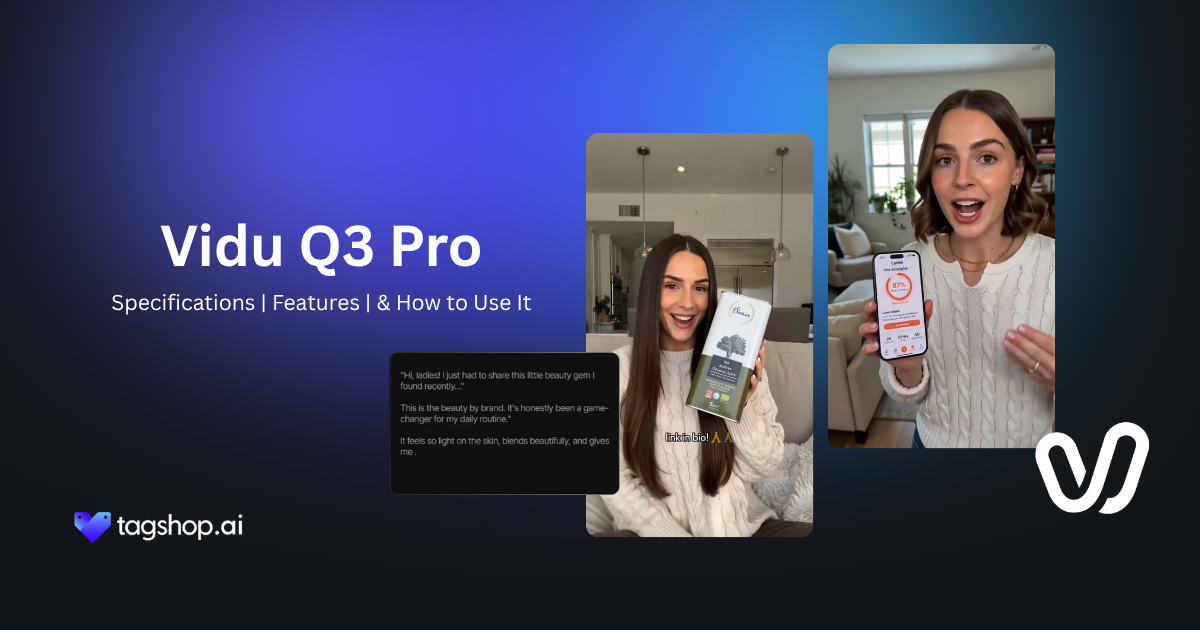







Vidu Q3 can generate two people having a conversation.
Not two clips cut together, one generation: both faces and both voices, timed so you can tell who is speaking. That is a different goal from most AI video, which is happy to make one subject move for a few seconds. Vidu Q3 aims at the whole scene, with the dialogue and camera moves built in.
ShengShu Technology released it in 2026, and it runs inside Tagshop AI’s Asset Generator. This review covers what it can actually pull off, and where it comes up short.
What is Vidu Q3?
Vidu Q3 is the third-generation video model from Vidu AI, built by ShengShu Technology in Beijing. It makes video from text, from an image, or from a start-and-end frame, and it generates the audio in the same pass as the picture.
The positioning is storytelling rather than clip-making. Most video models still think in terms of a single shot; Vidu Q3 tries to produce a scene, with dialogue, sound, music, and camera direction generated together. It also ships as a family of task-specific models instead of one general version, which is unusual, and it sits in theAI video generator lineup on Tagshop AI next to the models built for longer or larger jobs.
Type any Prompt Below and Generate an AI Video with Vidu Q3
Vidu Q3 at a glance
| AI Model | Vidu Q3 |
| Developer | ShengShu Technology (Vidu AI) |
| Released | 2026 |
| Type | AI video generation |
| Modes | Text-to-video, image-to-video, start and end frame |
| Audio | Native, generated jointly with the video |
| Dialogue | Multi-speaker, with speaker changes and timing |
| Languages | English, Chinese, Japanese |
| Resolution | 1080p (official), no 4K |
| Clip length | 1 to 16 seconds |
| Editions | Q3 Pro, Mix, Drama, Ad, Turbo |
| License | Closed, proprietary |
| API | Yes, via the Vidu Platform API |
| Available on | Tagshop AI |
What Vidu Q3 does well
It can stage a two-person conversation
This is the feature that sets Q3 apart. It handles multiple speakers in one clip, with the dialogue timing and the speaker changes generated together, so a back-and-forth exchange comes out synced rather than assembled.
That makes it a real fit for short dramas, narrative ads, and comic-style videos where the point is people talking to each other. For single-speaker, lip-synced pieces, it also pairs well with a talking-head workflow. The limit is scene complexity: the more people and the more overlap, the harder the timing is to hold.
Sound and picture, generated in one pass
Q3 generates dialogue, narration, ambience, effects, and music alongside the video rather than as tracks added later. Because one model makes both, lip-sync and timing line up on their own, which early users flag as the standout.
The trade-off is control: joint generation gives you less granular say over the mix than editing dialogue, music, and effects on separate tracks. It shares this native-audio strength with a model like Happy Horse 1.1; where Q3 goes further is the multi-speaker dialogue and scene structure.
Connected shots and scene cuts in one generation
Rather than a single static shot, Q3 can produce connected scenes within one generation, attempting transitions and shot progression on its own. For a short narrative beat, that means the cut from a wide to a close-up happens inside the clip instead of in an editor afterward. It is not a full edit suite, and long or complex sequences still need stitching, but for a self-contained scene it does real narrative work.
Direct the camera by the frame
Camera control is frame-accurate here. Instead of asking for something vaguely cinematic, you can direct a push-in, a pan, a zoom, and the pacing of each, and the model treats those as instructions. It rewards thinking like a director: name the move and the timing, and the shot follows.
Speech in English, Chinese, and Japanese
Q3 generates speech and storytelling in three languages, which matters if you are producing narrative or dialogue content for more than one market. It is three languages, not dozens, so confirm your target language is covered before you build around it.
Expression and motion hold up
Two things early users single out: facial expressions and subtle movement read as more natural than many rivals, and fast action generally stays coherent. Some report occasional stiff or robotic limb motion in busy action, so physics is not flawless, but for expression-led and dialogue-led scenes it is convincing.
Type any Prompt Below and Generate an AI Video with Vidu Q3
The five Vidu Q3 models, and when to use each
Q3 is not one model. It ships as five editions tuned for different jobs, which is rare in this category and worth matching to the task.
- Q3 Pro is the best all-round quality, with native audio and smart scene cuts. Use it when the output has to look its best.
- Q3 Mix is the balanced general-purpose option, good quality and consistency for most workflows.
- Q3 Drama is tuned for comic dramas, dialogue, and character positioning, the pick for narrative and conversation scenes.
- Q3 Ad is built for advertising and commercial creatives, so it is the natural choice for product and marketing video.
- Q3 Turbo prioritizes speed over maximum quality, for fast drafts and iteration.
How to use Vidu Q3 on Tagshop AI
Step 1: Start from a prompt, an image, or a start-and-end frame.
Paste your product URL or upload assets. Early users find image-to-video one of Q3’s strongest routes, especially from a high-quality reference.
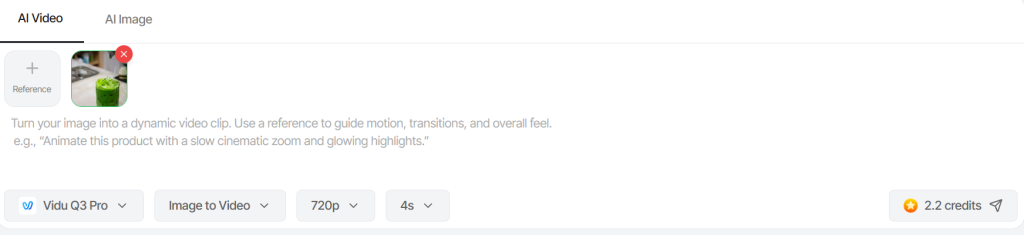
Step 2: Select the model Vidu Q3 Pro.
After choosing the model, describe the action, any dialogue lines and who says them, and the camera moves.
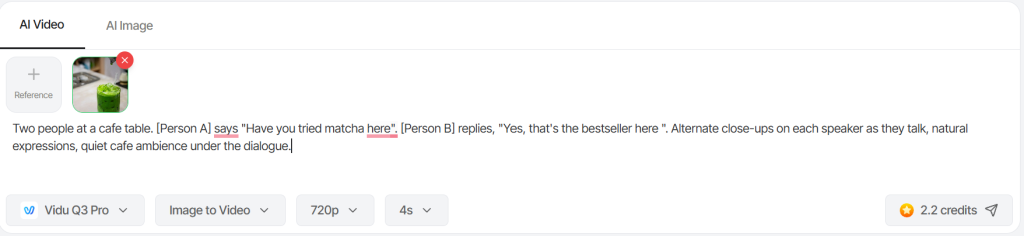
Step 3: Generate with sound, review, and export.
Watch the scene with its audio, adjust, and export for social or ads. Build longer stories by generating scenes and stitching them.
Type any Prompt Below and Generate an AI Video with Vidu Q3
Vidu Q3 prompts that work
Write the dialogue and the camera as deliberately as the visuals. Swap the brackets.
Two-person conversation
Two people at a cafe table. [Person A] says “[line]”. [Person B] replies “[line]”. Alternate close-ups on each speaker as they talk, natural expressions, quiet cafe ambience under the dialogue.
Short dramatic scene
A single scene: [character] enters [location], pauses, and reacts to [event]. Push in slowly on their face as the mood shifts. Subtle score building, one line of narration: “[line]”.
Narrative ad (Q3 Ad)
A 15-second ad for [product]. Open wide on [setting], cut to a close-up of the product, end on someone using it and smiling. Upbeat music, a short voiceover: “[copy]”. On-screen text: “[tagline]”.
Image-to-video with camera control
Animate this image: a slow pan across the scene, then a push-in on [subject]. Natural ambient sound. Keep the subject identical to the still.
Multi-language version
The same scene as above, with the dialogue and voiceover in [Japanese/Chinese], keeping the timing and lip movement matched to the new speech.
Who Vidu Q3 is for
It fits people making short narrative content where dialogue and scene structure carry the piece. Short-drama and comic-video creators get the most obvious benefit from multi-speaker dialogue and scene cuts. Marketers producing narrative ads can lean on the Q3 Ad edition and the built-in voiceover and music. Anyone making conversation-led or character-led clips, explainers, testimonials, or dialogue scenes gets a version that arrives with its sound timed.
It is a weaker fit for long-form video, large reference-driven projects, or 4K delivery. For episodic content produced at scale, the per-clip cost and the 16-second ceiling add up, so a longer-context model is the better call there.
How Much Does Vidu Q3 Cost?
Vidu’s API pricing is transparent and credit-based, at $0.005 per credit. Q3 Pro uses 24 credits per second at 1080p, which works out to about $0.12 per second, or roughly $1.92 for a full 16-second clip before tax. Off-peak generation halves the credit cost. Consumer subscription pricing varies by plan and platform.
For creators producing a lot of long episodic content, that per-second cost is the thing to watch, it is reasonable per clip but adds up at volume. Inside Tagshop AI, Vidu Q3 is one of the models in the Asset Generator under your plan; see Tagshop AI pricing for current details.
Vidu Q3 vs Happy Horse 1.1, Seedance 2.5, and Veo 3
Several models now generate audio with the video. They separate on what else they do. Here is the honest split.
| Model | Developer | Native audio | Standout | Length | Best pick when | On Tagshop AI |
| Vidu Q3 | ShengShu | Yes | Multi-speaker dialogue, scene cuts, five task-built editions | 16s | You want a narrative scene with people talking | Yes |
| Happy Horse 1.1 | Alibaba | Yes | Short single-subject cinematic clips, tight consistency | 15s | You want a polished short clip with sound | Yes |
| Seedance 2.5 | ByteDance | Yes | Long-form and large reference libraries | Long | You need length and scale | Yes |
| Veo 3 | Yes | Premium commercial quality | Short | You need top-end polish | Yes |
The short version: choose Vidu Q3 when the scene needs dialogue, multiple speakers, or narrative cuts, and pick the edition that fits the job. Choose Happy Horse for a short, single-subject cinematic clip, Seedance for length and large reference sets, and Veo for premium commercial finish. They all sit in the Tagshop Asset Generator, so you can run the same idea through each.
Where Vidu Q3 Falls Short
Know these before you commit:
- Clips cap at 16 seconds. Longer narratives mean generating several scenes and stitching them.
- Output tops out at 1080p. No official 4K, which may fall short for high-end commercial delivery.
- Fewer production tools. No large multimodal reference libraries, timeline editing, or localized in-video editing, its strength is generation, not end-to-end production.
- Less granular audio control. Joint audio helps sync but gives you less say than mixing separate tracks.
- Physics can slip. Busy action scenes sometimes show stiff or robotic limb motion.
- Cost adds up at scale. Reasonable per clip, but expensive for creators making long episodic content in volume.
None of these hurt much for short, dialogue-led scenes. They matter if you need length, scale, 4K, or fine audio mixing.
The bottom line
Vidu Q3 is the video model to use when a clip needs to be a scene, with people talking, sound already timed, and cuts handled inside the generation. Multi-speaker dialogue, native audio, frame-accurate camera control, and five task-built editions make it a genuine step toward publishable scenes instead of raw footage. It is not built for long stories, 4K, large reference libraries, or fine audio mixing, and busy action can still trip its physics. But for short, dialogue-led, narrative video, it does something most models cannot, and on Tagshop it sits beside the models that cover length, scale, and polish.
Vidu Q3 is available now in the Tagshop AI Asset Generator. Try Vidu Q3 on Tagshop AI →
Frequently Asked Questions
Vidu Q3 is the third-generation AI video model from ShengShu Technology (Vidu AI), released in 2026. It generates video with synchronized audio in one pass, supports multi-speaker dialogue and scene cuts, and ships in five task-specific editions. It is available on Tagshop AI.
Yes. It generates dialogue, narration, ambience, effects, and music jointly with the video, so lip-sync and timing align on their own rather than needing a separate audio pass.
Yes, and it is a defining feature. Q3 handles multiple people talking in a single generation, with speaker changes and dialogue timing, which suits short dramas, conversations, and narrative ads.
Five editions: Q3 Pro for best all-round quality, Q3 Mix for balanced general use, Q3 Drama for dialogue and comic drama, Q3 Ad for commercial creatives, and Q3 Turbo for speed.
Both generate native audio. Vidu Q3 goes further on multi-speaker dialogue, scene cuts, and specialised editions, so it suits narrative scenes. Happy Horse focuses on short, single-subject cinematic clips. Both are on Tagshop AI.
No. The official output is 1080p, with no native 4K announced, so for high-end delivery, a higher-resolution model is the better choice.
Written by:

Kashish Vaswani is a Content Strategist at Tagshop AI, specializing in AI-powered marketing, UGC advertising, and eCommerce content. She creates actionable guides, industry insights, and product-focused resources that help brands, marketers, and creators leverage AI to produce high-converting video ads and scale their content strategy with confidence.
 Add Tagshop.ai as a preferred source in Google Search






 Introducing

 Wan 3.0 is now live on Tagshop AI
